WhatIFF Issue 1.01 WhatIFF Issue 1.02 WhatIFF Issue 1.03 WhatIFF Issue 1.04 WhatIFF Issue 1.05 WhatIFF Issue 1.06 WhatIFF Issue 1.07 WhatIFF Issue 1.08 WhatIFF Issue 2.09 WhatIFF Issue 2.10 WhatIFF Issue 2.11 WhatIFF Issue 2.12 WhatIFF Issue 3.13 WhatIFF Issue 3.14 WhatIFF Issue 3.15 WhatIFF Issue 4.16 WhatIFF Issue 4.17 WhatIFF Issue 4.18 WhatIFF Issue 5.19 WhatIFF Issue 5.20 WhatIFF Issue 5.21
Download PDFWhatIFF? Issue 4.17
TopWhatIFF? For The Creative Amiga User
CONTENTS +#### #### ###%## +####+########+########+ +####+ `#+ `## #' ## `## `##+ +#+ `##+ +#+ +##+ +#+ ## ## # +#+ +#+ +#+ #' +#+ #' +#' ## ## ## +# ## # ## ## + ## + +#+ +#+ +## #+ ## %#. ## ## +# ## +# ## ## ###+ # ##+#+ +#.## #### ## ##### ##### ##' ## #+## # #####+ ##+### +# ## ## +# ## +# +#' +#+# ##+# ##'+## +#+ ## ## ## ## + ## + #+ ..:###.###+.+#+ ## ## #+ +#+ +#+ +#+ +#+ +' ::::##+:###::##::+##:##+:+#..##..##'..##'......##'............. :::::+#::+#+::##::##+%+##:###%##:;##:::##:::::::##:::::::::::##::::.. `::::#:::#:::#+::+##::+##+ #:+######+####+:::+####+:::::::::##::aNdy; ..;::::::::::::::::::::::::::::::::::::::::::::::::::::::::::::::;' .::::::::::::::::::::::::::::::::::::::::::::::::::::::::::::;' `:::::::::; ,:::::::::::::::::;'`.::::::::::::::::::::;' `:::::; :::::::::::::::;' `::::;' For The Creative Amiga User! `:::::::::;' >> ENTER MAGAZINE <<TopWelcome to WhatIFF?
CONTENTS============================================================================= -# WhatIFF? - Issue 4.17 - October 2025 #- Music ----------------------------------------------------------------------------- --EDITORS DESK-- -MEET THE WRITERS-- A few words from the editor and meet the writers of WhatIFF? ---SHELL TALK--- -----TALK BACK----- Amiga soapbox and readers letters. -----REVIEWS---- ---GAME REVIEWS---- Reviews of hardware and software, old and new. -----GUIDES----- -----ARTICLES------ Guides and support for all things Amiga. -TALKING AMIGA-- Interviews with people making a difference in the Amiga community. -----LINKS------ ---AMIGA VENDORS--- ---AMIGA GROUPS---- Amiga related links and Amiga vendor websites. -ADVERTISEMENTS- Vendor advertisements and more. ---COVER DISK--- --------===============================================================------ NEXT ISSUE *All content copyright of the respective authors 2025* --------===============================================================------
TopFrom The Editor's Desk
CONTENTS ============================================================================= From The Editor's Desk - by: Timo Paul ============================================================================= This is the issue that almost never was, first off I want to apologise to everyone for the lateness of this issue, it was originaly planned for usual August time, however things got in the way. Firstly if you had read the last issue you will be wondering what I am doing here still. Well, sadly Bill due to health issues was unable to take over the magazine, unfortunately this was found out about a month before the issue was due and no work had been done at that time. So, I needed to step back in but as fate would have it I got hit by some health issues which meant I could not be at my Amiga to work on the issue. Sod's law indeed! But here we are once again back with another issue. As I sit here in the closet with my Amiga .... I will explain more about this next issue, the weather has finally started to cool off in Japan from the stifling 37-40 degrees. Though it is October the temperature is still 30 degrees some days and then if we are lucky 25 degrees. To say that I am tired of summer would be the understatement of the year. However, the weather has cooled off finally issue 4.17 is finished, in this issue we have two great guides from Roald Strauss about noise reduction and making multiple formats of your music. There is also a continuation of the DigiPaint series of tutorials and a deep dive into some of the extra features of AmigaGuide. Review wise it is a mixed bag of software with the Sony CD PCGA-CD51 and free driver from Aminet, Amiga OS3.2.3 and more! Finally to top it off we have three great interviews with the Boris Krizma developer of the Furia, Frank Neumann developer of the new game A100 and Szilard Biro a software developer known for the DarkForces conversion. Admittedly it is a slimmer issue this time but rest assured the next issue is already in the works with more content and, touch wood, will be in time for before Xmas. Thank you to everyone who has contributed to this issue and those who contacted the magazine asking about the next issue. I hope you will enjoy what we were able to come up this time. Until next issue, take care!TopLetters From WhatIFF? Readers
CONTENTS ============================================================================= Talk Back: Letters From WhatIFF? Readers January-October 2025 ============================================================================= Welcome to Talk Back, the section of the magazine where we publish a select few of the letters that we receive. Thank you to everyone who has written in and those who have gone on to write articles for the magazine. We always welcome any written contributions to the magazine. Everyone has a unique perspective and Amiga story to tell. If you wish to write to the magazine or contribute then please contact us at: submissions@whatiff.info ----------------------------------------------------------------------------- -----------------------------------------------------------------------------TopFree For All About Anything
CONTENTS ============================================================================= Shell Talk - by: Timo Paul ============================================================================= Would you believe it that we have had three new Amiga announcements this year? First came the A1200NG, while that is more of a motherboard product it was quickly followed by the official announcement of The A1200 with pictures and then in September Apollo Computers has launched the A6000. For those who do not know of it, it is the V4+SA in an A600 like shell with all the ports plus 2GB ram and a faster processor by the looks of it! Of course with all this power comes a hefty price of 1,000 EUR but considering that 700 EUR asking price for the V4+SA this seems a good deal. If we are honest though the Vampire computers were never aimed at the casual or do I even venture to say that average user, they are amazing computers but they have always carried heavy price tag. But this is part of what makes the Amiga community such a great place to be. Here we are 40 years later and new hardware is being made and yet we still find the effort and time to complain in long threads about how it is not a 'real' Amiga, it is too expensive for 'real' users, FPGA verses emulation. Reading the forums can get quite exhausting and I am already tired enough after reading what is happening around the world in the newspaper. It still amazes me that after all the Amiga community has been through we still find ways to attack each other and try to pull down other's efforts. Well, you know what, I am not going to participate in this anymore, I think we need more positive thinking in the Amiga community and try to give support when we can. It is much easier to complain and try to destroy what one has made than rather support them. So, here we go! AmigaKit, well done on the A1200NG, it is a unique and exciting way to extend the Amiga. What you guys are doing with introducing ARM libraries is very exciting and I am looking forward to what the future holds. RetroGames Ltd. thank you for answering the calls of Amiga users around the world, The A1200 looks most exciting and it is going to be great to have a full size Amiga at a hopefully reasonable price. What a great way to get new users hooked on the awesomeness that is Amiga. Apollo Computers, congratulations on bringing a fully blown Amiga from the V4, you guys have pushed the next generation Amiga for such a long time and it is so exciting to see a real next generation Amiga available again. If you feel so inclined to send a review model I would not be offended in the least. This also goes for Retro Games Ltd. and AmigaKit, no one will feel in the least be slighted to receive some gear to review. Since none of these three companies will be reading this magazine I can feel safe writing the above words. But aside from wanting to play with some new Amiga hardware I think it is such an exciting time to be an Amiga user. We have so much to look forward to at the end of 2025 and it will be very exciting to see what the next year will hold. But at least for me, I will look at things will a more positive light and try my best to support those who are still contributing to our scene from making music, art, software to hardware and Amiga content such as videos, podcasts and magazines. And if you ever are feeling down then go to YouTube and watch some AmigaBill to power up your positive Amiga energy again.TopWelcome to the reviews section!
CONTENTS ============================================================================= -= R E V I E W S =----------------------------------------------------------- ----------------------------------------------------------------------------- -= Hardware Review: PowerShark USB =- Martyn looks at the highly sought after PowerShark USB power adapter for the A500/A600/A1200. -= Hardware Review: HID2AMI v3.1 (v4 Firmware) =- Reviewed back in issue 10, Martyn examines the latest version of one of the best USB mouse/joystick adapters available for the Amiga. -= Software Review: Amiga 1200 Backgrounds =- Feeling not up to making your own Workbench backgrounds, but want to spruce up your desktop, then this little pack just might what you are looking for. -= Software Review: Amiga OS3.2.3 Update =- April 1st this year our favourite OS got another update, find out inside if it was just another April Fools joke or a worthy update for you Amiga. -= Hardware/Software Review: SONY PCMCIA CD Drive & Driver =- Just in time for this issue there has been an update to the SONY PCMCIA driver for Amigas, we take the drive and software for a test run. ----------------------------------------------------------------------------- #Reviews - WhatIFF? Issue 4.17 - October 2025#TopHardware review: PowerShark USB
Reviews ============================================================================= Hardware review: PowerShark USB - by Martyn Bampton ============================================================================= Product Name PowerShark USB C to Amiga Power Adapter. Developed By Mad Hackers Lab. Available From Alinea Computer https://www.amiga-shop.net Flamelily Retro Shop https://www.shopflamelily.co.uk MicroMiga https://www.micromiga.com Price 80 EUR. Hardware Requirements * Amiga 500/600/1200/CD32 (requires an adapter cable). Test Devices * Amiga 500 * Amiga 600 * Amiga 1200 * CD32 PowerShark Image 1Introduction I've been wanting to try a PowerShark for a while and like many others I've been [not very] patiently waiting for them to come back into stock. I've seen USB C power adapters for other devices (including the BBC Micro) and was hoping someone would produce one for the Amiga. The concept is simple, use a readily available USB C PD power supply and convert the voltage (12V) it provides into the +5V, +12V and -12V power rails the Amiga requires. The PowerShark Website lists USB C PD power supplies known to work along with many technical details, some highlights are: * Ultra-efficient USB-C power for your Amiga 500, 600 and 1200. * Clean, stable energy supply. * Advanced monitoring and protection features. * Possibility of using a USB C PD battery pack for a portable Amiga! PowerShark Image 2
There have been several good reviews of the PowerShark including a great video by Rob Smith. This review is not as in depth since Rob does a great job and I recommended watching his video. This is my own experience as an end user. PowerShark Image 3
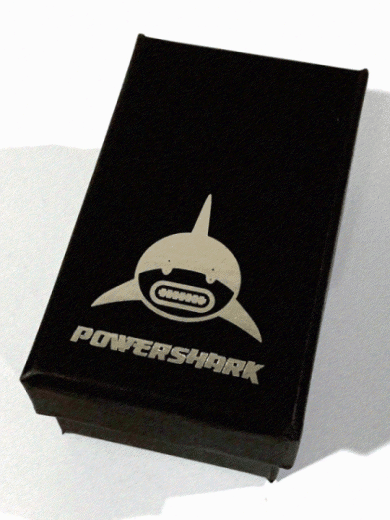
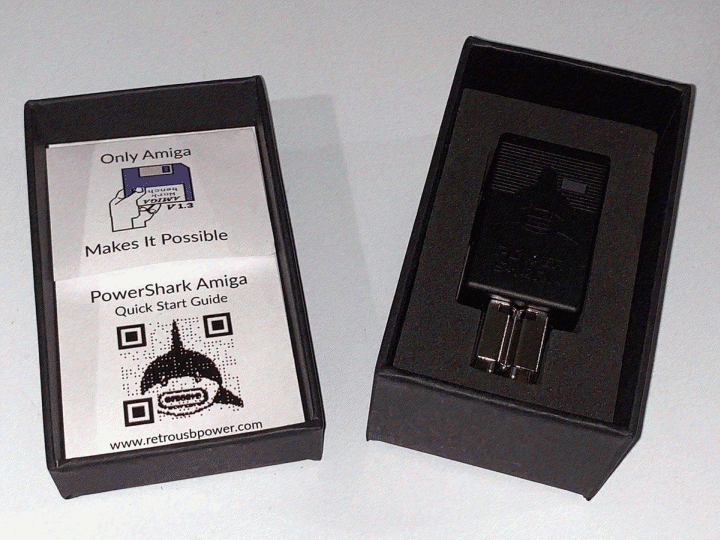
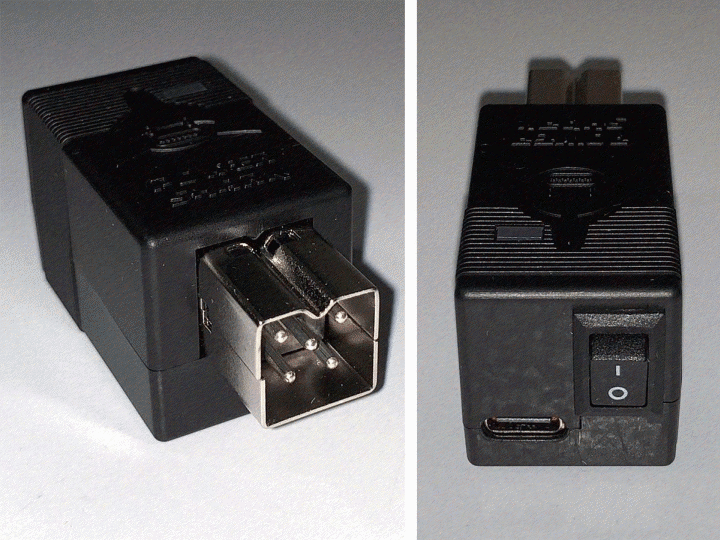
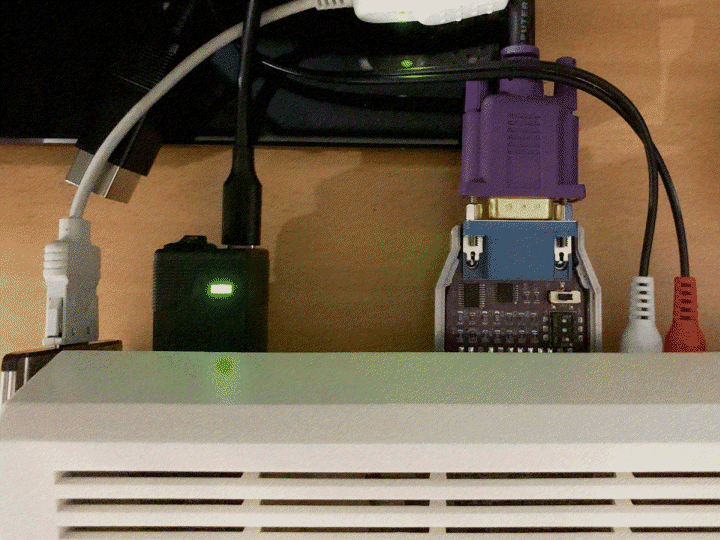
Impressions and Use The unit arrived in a rather snazzy black box with a silver embossed PowerShark logo on the cover, much like an expensive phone packaging would. If you opt for a light grey unit then the box is white with a black logo, it's a nice touch and feels quite premium. Inside the box lid there is a quick start guide and a sticker, in the box you'll find the PowerShark itself snugly nestled in a foam insert. Again, this is an excellent unboxing experience and it's clear a lot of thought has gone into it. Remember this is a voltage adapter indented to be used with an existing USB C PD power supply - Unless you ordered your PowerShark with a USB power supply and cable then you'll have to provide those yourself. At only about 6 cm (L) x 2.5 cm (W) by 3 cm (W) including the square DIN power connector it's really compact, the case feels well made and it molded accurately. On the top there's a PowerShark logo and an indicator LED, on the front there's the Amiga power connector (power out) and on the back there's a USB C port (power in) and a power switch. The case has stripes molded around the rear, reminiscent of many Amiga power connector housings in keeping with the Amiga case design. Another example of attention to detail. The power specifications when using an appropriate USB C PD supply are as follows: +-----------+------+------+-------+ | Current | 5V | 12V | -12V | +-----------+------+------+-------+ | Sustained | 4.5A | 1.0A | 0.1A | +-----------+------+------+-------+ | Peak | 6.5A | 2.0A | 0.13A | +-----------+------+------+-------+ I bought an Amazon Basics USB C PD adapter as recommended on the PowerShark Website, I also ordered some UGreen USB C to USB C cables. Before plugging the unit into my Amiga I tried it on the USB C power adapter and cable on their own. If the supply is able to be used by the PowerShark then the LED will change colour from red to green, a very handy built in test. The LED will also turn red if the unit detects a power issue (under/over voltage/short circuit) and it has a built in power cycling delay to avoid start up issues due to incomplete cycling. I got the green light so I turned off and then plugged it into my Amiga 500 (TF536) and turned it back on. A power switch almost on my Amiga, brilliant! Everything started normally and several hours of use passed without incident, it was stable, quiet and there wasn't any noticeable heat from the device. The smaller USB C cable really helps with cable clutter at the back of the Amiga. One thing to note is on the A500 the height of the PowerShark and the proximity to the parallel port means it might block the power port on some versions of the PLIPBox parallel network adapter. PowerShark Image 4
I also tried it with my A1200 (TF1260) and CD32 (via an adapter cable). The A1200 happily booted consistently, ran Starstruck, Silkcut and some other demos, MP3s and games. The PowerShark remained fairly cool, perhaps only lukewarm to the touch. The CD32 worked as expected and if they ever make a round DIN CD32 version. I'd certainly get one for the convenience and cable clutter reduction. For minimalists this will be fantastic! Summary Amazing. Worth the wait. I want another. All phrases that jump to mind - Really though this is a very well thought out, designed, implemented and presented device. It's a premium product and therefore not cheap. I appreciated the thinner USB power cable and the built in protections including the power cycle delay. While certainly not a must buy for everyone I think it's worth considering, for the protection it provides alone if nothing else. Oh and the shark's mouth in the logo is a USB C connector, nice. Pros and Cons + Lets you use a USB C PD power supply/charger and thin USB power cable. + Compact! Helps tidy up your desk. + Voltage monitoring and short circuit protection features. + Very nice packaging and good online documentation. + Power switch right on the back of the unit (and therefore Amiga) with restart delay. + Indicator LED lets you know right away if the USB C power supply is insufficient. + You probably had a suitable USB C PD power supply already for another device. + Easily power your Amiga from a USB C PD battery pack! - Might block access to some PLIPBox adapter power ports. Other Key Points: * Works with a CD32 like any Amiga 500/600/1200 power supply, you just need an adapter cable. Scores Ease of use: 100% Documentation/Packaging: 100% Value for money: 80% Overall: 95% - WhatIFF Gold Sources and Credits Sold by Alinea Computer: https://www.amiga-shop.net/en/Amiga-Hardware/Amiga-classic-hardware/PowerShark-Ultra-efficient-USB-C-Power-for-the-Amiga::1424.html Created by Mad Hackers Lab: https://www.retrousbpower.com Rob Smith?s in depth test:https://www.youtube.com/watch?v=kLQis0jZJ0c
TopHardware review: HID2AMIv3.1
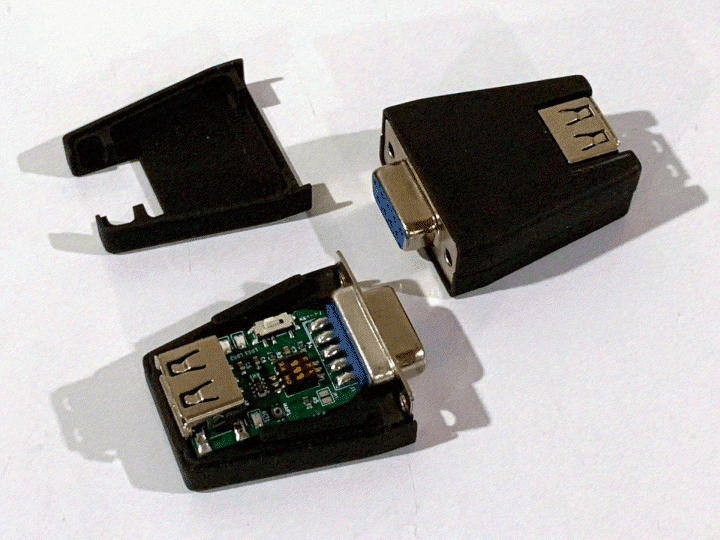
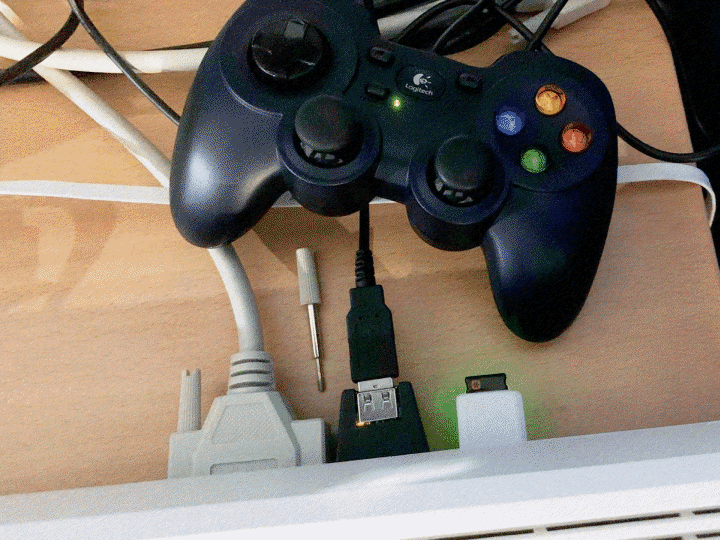
Reviews ============================================================================= Hardware review: HID2AMIv3.1 - by Martyn Bampton ============================================================================= Product Name HID2AMIv3.1 Developed By EmberHeavyIndustries (sampedenawa) Available From AmiBay https://www.amibay.com/threads/2451017 Price 36 EUR Hardware/Software Requirements An Amiga, Atari or C64 with a free DB9 mouse/joystick port. Test Devices * Amiga 500 * Amiga 600 * Amiga 1200 * CD32 HID2AMI v3.1Introduction As our editor mentioned, an earlier version of this adapter was reviewed previously in issue 10. This is an updated look at the latest version (3.1 with firmware V4) which adds the following features: * Tiny size. * Resin cases available (by Lemaru). * Onboard DIP switches to select Amiga, Atari or C64 mode. * Backward compatible with V2.1. Full details can be found here: https://github.com/EmberHeavyIndustries/HID2AMI Impressions and Use Straight away the build quality and size are really quite impressive, I also ordred a V3.1 case for the adapter in CD32 grey which is equally well made in resin. It's similar in size to the Tikus but doesn't quite fit into my A600's ports without removing the case and trimming the DB9 connector's housing. I just used a short extension cable rather than modifying the adapter but do be aware of this if you have an A600. My case was a little loose but a small piece of clear tape fixed that. In addition to the DIP switches for Amiga/Atari/C64 mode there's also a switch for DFU mode to enable firmware updates, this having previously been a jumper and/or solder pads. To update the firmware you connect a USB A to USB A cable (male to male) to the HID2AMI and to a Windows or Linux computer. There are complete firmware flashing instructions on the project Website but one important warning is to unplug the HID2AMI from the Amiga before connecting it to another computer for updating. Support for devices continues to improve and every mouse I tried just worked, mouse scroll wheel included. All my joypads worked including my TheA500Mini's TheGamepad which was great! However while my Competition Pro (Extra) didn't work, some earlier Competition Pro USB joysticks do, reportedly. I sent a HID dump off for investigation but it can be a difficult problem to solve without access to the physical device. Amazing that you submit that so an attempt can be made to include new devices, great product support and makes it better for everyone. HID2AMI v3.1 with Joypad
Summary This is a great update! The reduced size, improved device support and resin case option are all welcome improvements. While I didn't test them, the addition of Atari and C64 modes will no doubt be a plus for users of those computers. I was disappointed it didn't fit my A600 directly, however that's hardly a new problem and many devices have that issue. On the other hand it looked great on my CD32 with the colour matching really well. I will be recommending the HID2AMI for those looking for a USB mouse/joypad adapter as it just works. Friendly ordering experience and after sales support included! Pros and Cons + Excellent USB mouse support with scroll wheel. + Great joypad support, huge list of supported devices on the project page. + Firmware updatable. + Amiga, Atari and C64 support. + Price is reasonable for the features you get. + Good product support. - Won't fit the A600 without modifications or an extension cable. Other Key Points: * Resin case available. * Never plug the HID2AMI into an Amiga and other computer (USB-USB) at the same time! Scores Ease of use: 100% Documentation/Packaging: 90% Value for money: 80% Overall: 90% - WhatIFF Gold Sources and Credits Sold by EmberHeavyIndustries: (sampedenawa) https://www.amibay.com/threads/2451017 Case by Lemaru
TopSoftware review: Amiga OS3.2.3 Update
Reviews ============================================================================= Software review: Amiga OS3.2.3 Update - by Timo Paul ============================================================================= Product Name Amiga OS3.2.2 Update Developed By Hyperion Entertainment (Amiga OS3.2 Development Team) Available From Hyperion Entertainment https://www.hyperion-entertainment.com Price Free Hardware/Software Requirements A registered copy of Amiga OS3.2 with serial number Introduction In April 2025 our favourite computer got a new Workbench update in the form of Amiga OS3.2.3. Even after all these years it still suprises me when the Amiga gets a new OS update. In fact initially I was skeptical due to the release being in April, "Oh no, here is another Amiga April Fools joke!" but luckily the news turned out to be real and all registered Amiga OS3.2 users were treated to another update. So, what are the some of the changes/improvements in 3.2.3? In total there have been over 50 improvements, I will not list them all here for convenience sake and just list the most important ones. * 12kB less Chip RAM use, very useful for older systems. * Better compatibility with older software. * Improved ReAction library making for a smoother user experience. * More powerful TextEditor: now supports custom menus and macros. * Ram Handler improvements making for a more stable Workbench experience. * ADF improvemens such as smoother ejection of ADF disk. * Updates to Icon Edit. * Overall system performance improvements via optimisations to various libraries such as: workbench.library, locale.library, als.library and our favourite, amigaguide.library. * Kickstart 3.2.3 ROM: Improves overall system compatibility and performance. While this lists only a fraction of the improvements you can get a gist of the type of improvements you can expect. Overall you will experience a faster and snappier Workbench. The update can be downloaded from the Hyperion website and comes in at around 18Mb in .lha compressed format. Obviously you need to be a registered Amiga OS3.2 user to download the update. Installation Installation is very easy, just copy the .lha file to a CF disk or your internal drive, extract it and get ready to install. One aspect that I was particularly impressed by, and I am not sure if this was the same with the last update but you do not need to manually open each ADF disk. As long as you run the installer from the same directory where the other ADFs are stored it will automatically mount the required ADF. This makes for a very simple and hassle free installation, even better than using a GOEX drive. As with previous releases, you dot not need to install new kickstart roms as the startup-sequence will check if you have the required rom and if not it will load it from the hard disk into memory. I was initially worried as my Amiga is an NTSC model and I use a patched kickstart 3.2.2 to force the Amiga into PAL mode from the get go. Even with the new kickstart loaded during the bootup sequence the I did not lose my PAL setting. Final Thoughts Getting Workbench updates in 2025 still feels pretty amazing and more so that they are available for free. This is a solid update that brings system stability and speed improvements to our aging girlfriend. If you have not updated to 3.2.3 then now is the best time, if you are still on Workbench 3.1 then it is time to support the Amiga community and purchase 3.2 and help Amiga Workbench grow into something even better. If you want to get the most out of your Amiga then upgrading to Amiga OS3.2/3.2.3 is your best bet. With the freed 12kB of Chip RAM a boon to older systems or even those of us who are always looking for ways to save more Ram, especially if you are working with graphics and audio. The new improvements to the ReAction library and TextEdit make for a better Workbench experience. I find myself using TextEdit more for editing the magazine due to the improvements. You and your Amiga both deserve this update, download/purchase it today. Pros and Cons + Free to update. + Installation simple and easy. + Over 50 improvements. + Can see and feel the improvements. - None.TopHardware/Software Review: SONY PCMCIA CD Drive & Driver
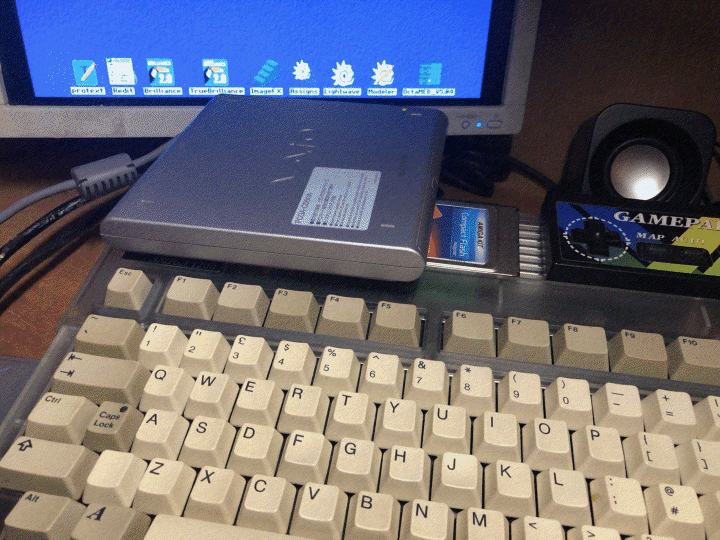
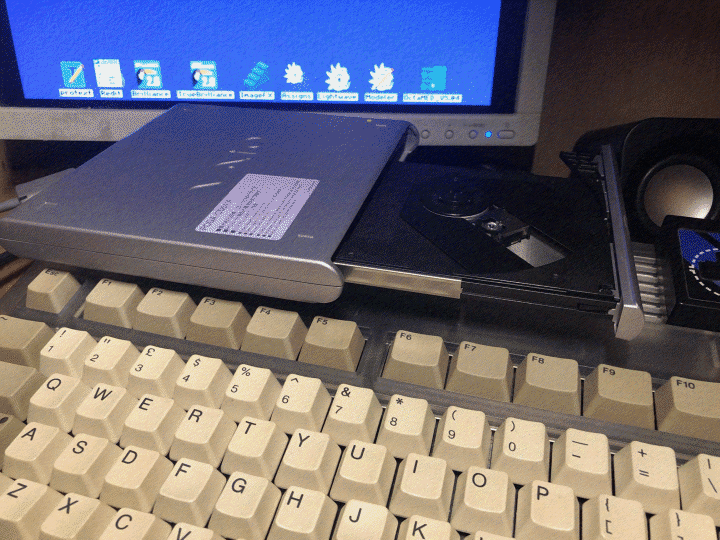
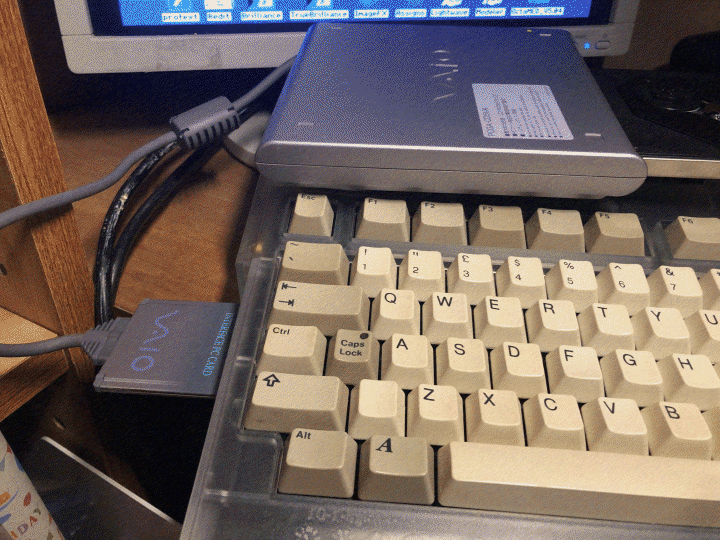
Reviews ============================================================================= Hardware/Software Review: SONY PCMCIA CD Drive & Driver - by Timo Paul ============================================================================= Product Name PcmciaCD & Sony PCGA-CD51 Developed By Adian Holmes (Driver) Available From Driver: Aminet https://www.aminet.net/package/driver/media/PcmciaCD Sony CD Drive: AmiBay/Yahoo Auction Japan Price Driver: Free Sony CD Drive: 10 USD ~ 90 USD Hardware Requirements PCMCIA Port Review SONY CD Drive ClosedThis review has been a long time coming,initially I had planned for it to appear two issues back but due to issues that I will cover below, I felt it best to wait until I could fix them. Luckily there were several updates to the Sony PCMCIA driver in July that has fixed my issues. PCMCIADD.device is a driver for the Sony PCGA-CD51 PCMCIA CD-ROM, it is available from Aminet. The file is small coming in at 14K, and contains the following files: - CD0 - pcmciacd.device - PcmciaCD.readme Installation is a very simple task of copying the pcmciacd.device to DEVS: there is also an example mount file CD0 that can be copied to DEVS:DOSDrivers. If you use an exisiting CD0 mount file, such as the one included with AmigaOS3.2, you will need to update the ToolTypes to the following: DEVICE=pcmciacd.device UNIT=0 Only unit 0 is available, changing this will cause the Sony drive to not appear. As you can see it is a very simple installation. So, why did it take me so long to write up a review of the drive and driver? My Amiga runs on OS3.2, and I had upgraded to OS3.2.3 as soon as it had been released. Prior to that, I was running 3.2.2. I purchased a Sony drive earlier in the year and ran into issues with the drive and driver straight away. The drive would not appear all the time, and when it did the drive access was slow at best of times, or simply non-existant. This was frustrating to say the least. I thought this might have been due to the drive, and luckily living in Japan the Sony PCGA-CD51 are dirt cheap, you can get a decent one for around 5 GBP, so I ended up buying three to see if it was hardware issue. To cut a long story short, all the drives had the same issues, so I presumed it was driver. Around April of this year the OS3.2.3 update was released, however this still did not fix my issue. I was about to give up in the entire thing when I noticed there was a new update to the Sony PCMCIACD driver available on Aminet in July. Again it was a simple case of downloading the driver and replacing the driver with the new one. And lo and behold, it worked! My disks started to pop up without delay and drive access was as it should be. SONY CD Drive Open
I have been testing the drive now for a few weeks and it has been working like a dream. Disks that were an issue for in the past, such as CD-Rs are now accesible. While I have not been able to measure the exact drive speed, it is a very snappy experience and copying files or opening videos and demos, takes only a short time. I did a few tests copying files over to the RAM disk, these were a file just over 1Mb and 5x1Mb is a group copy. Mind you this was a rough test, the speed came to just over 146.5KB/s, so not bad. Booting with the drive plugged in has been a bit hit and miss though, on a cold boot the Amiga will stop after loading but before bringing up Workbench it stops. This can be fixed by unplugging the drive and the Amiga will boot fine. Once the Amiga has been running for a while, a warm reset does not cause this issue. SONY CD Drive and PCMCIA Card
Final Thoughts Installation of the driver and drive are very easy, though you need to make sure you are running OS3.2.3 or there is a good chance you will run into issues. While the driver is free the drives vary in price, it seems if you buy them in the States or Europe you can expect to pay 3-4 times the actual price. I am lucky for once regarding Amiga compatible hardware and the CD drive is very cheap here. You can easily pick up one for between 10-20 USD. The CD-ROM drive itself is compact and looks good next to the Amiga, though the cable is a bit short meaning you are limited where you can place it. For my situation I ended up with it sitting on top of the Amiga. Not the best place but even with limited space like mine the drive is still usable. While it is now possible to access CD ISO images from Workbench this is still a nice way to relive the fun of accessing Amiga CD roms from the times when we did not have easy internet access and CD Roms were our only gateway to vast resources of software and media. Additional: Since first writing this review I have had more time to test the drive and one thing I have noticed is there is a higher chance of the driver causing the Amiga to freeze, if you are using a PiStorm. When I first wrote this review I was using a TF1260. Since then I have changed to a PiStorm and the issues started after only a few minutes of use. At the moment I cannot say what is causing the issue only that it started after switching to a PiStorm.
TopSoftware review: Amiga 1200 Backgrounds
Reviews ============================================================================= Software Review:Amiga 1200 Backgrounds - by Timo Paul ============================================================================= Product Name Amiga 1200 Backgrounds Developed By Captainnow2 Available From Alinea Computer https://captainnow2.itch.io/amiga-1200-workbench-screens Price Name your own price Hardware Requirements None Workbench Screen Image 1Introduction One of my favourite ways to pass time is to scan through the latest uploads on Aminet or itch.io., there is usually at least one item of interest. It was during one of these 'patrols' that I came across Amiga 1200 Backgrounds on itch.io. It stuck out as usually you find games on the website, to find a pack full of Amiga backgrounds was most interesting. You can download the pack for free or name a price. You get 26 images in 8 colours using the default Workbench palette and in PAL Hires 640x256. The backgrounds are made up of 9 x A1200 keyboard photos, 4 x Competition Pro Joystick photos, 6 x game boxes, 5 x various floppy disk compositions, 1 x CF card image, 1 x tank mouse, and screenshots of Gods, Speed Ball 2 and Chaos. Also included are screenshots of Workbench with each background in .JPG and and three png images of Workbench with the game backgrounds. Considering that the artist has stuck to the default Amiga Workbench palette the backgrounds come out quite nice. There is an awful lot of dithering though and while this probably could not be helped with the PAL Hires it becomes very apparent. If the images were made for PAL Hires Laced they would probably look better. Each image is around 62Kb in size, it seemed to take up around 100Kb of my Chipram which is not bad. Overall the backgrounds are quite nice, it would have been nice to have had something similar in the Amiga OS3.2 update instead of the simple Amiga OS3.2 backdrop. You definitely need to have a background fill on the icon text though, otherwise the text will be lost in the background. So if you are one who does not like to have their icons like that, this pack will probably not suit you. My only issue with the pack is that there are no proper file names, each one is named IMG_1551.iff for example. This makes it a bit tedious if you want a particular background. Saying that, this is a good background pack overall, the images look professional and it is nice they have the same palette as a stock Workbench install. The author has mentioned that more images are coming of the A500, A600 and CD32. If you are wanting to spruce up your Workbench and feel a bit lazy about making your own background then give this a try.
Topgamereviews
CONTENTS ============================================================================= -= G A M E R E V I E W S =-------------------------------------------------- ----------------------------------------------------------------------------- -= Game Review: A100 =- From iOS and Android to the Amiga, how well does this smartphone puzzler fare on the Amiga? -= Game Review: pjusk =- Another fun game from the Zooperdan stable, a remaster of a game that first came out for the PC. -= Game Review: YEET =- A new game from Zooperdan that came out just in time for this issue that puts a new puzzle twist on playing with rune stones. -----------------------------------------------------------------------------Topa100review
Gamereviews ============================================================================= Game Review: A100 - by Timo Paul ============================================================================= Product Name A100 Developed By Kevin Saunders - Graphics Krzysztof Odachowski - Music Frank Neumann - Code Frank Wille - ptplayer.asm Keir Fraser - inflate.asm Available From https://cobour.itch.io/a100 Price Name your own price Hardware/Software Requirements PAL Amiga with minimum 512Kb Chip RAM Test Machine Amiga 1200 TF1260 FS-UAE Review Generally I do not ever play games on a smartphone, aside from not having one anymore, I never really enjoyed the touch screen game experience. So, it was with completely fresh eyes that I came upon the game A100, that was announced on EAB in July of this year. Finding a comment regarding 1010 I had to do some research and found it a 10x10 puzzle game that came out in 2014 for iOS and Android. A100 is an Amiga version created by Kevin Saunders - Graphics, Krzysztof Odachowski - Music, Frank Neumann - Code, Frank Wille - ptplayer.asm and Keir Fraser - inflate.asm. The game can be downloaded from itch.io at https://cobour.itch.io/a100 for free but as always it is nice to show our appreciation to the developers by purchasing their games. The game can be downloaded in two flavors, ADF and WHDLoad, I chose the WHDLoad version as I have an 060 and games tend to run better under WHDLoad with faster CPUs. It was a simple case of copying the unpacked drawer to your destination and then running the game. I initially had some trouble with missing kickstart roms, but I rectified this by copying the Kickstarts drawer whole from my ClassicWB FULL install. If gaming is your main thing in my opinion the ClassicWB packs are really the best way to go. With the Kickstart directory in Devs I was ready to go, once the game is loaded you are presented with the title screen. It is a simple yet very stylized screen, you have the available options: (S)tart game (M)ode: Infinite (H)igh Scorees (C)redits (E)xit The letters in the brackets indicate the key press for that action, the mode is set to Infinite by default, there is only one other mode, Timer. Starting off at 99 seconds. Starting the game brings you to the made game area, the majority of the screen is taken up by the grid, consisting of 10 blocks either side, totaling 100 blocks, hence the title A100 perhaps? On the right side you have three smaller areas which display the available block pieces, you move around by the joystick or keyboard arrow keys, my favourite way to play. The aim of the game is select one of the shapes and place it on the grid, pressing Enter will select the shape but if you have made a mistake you can press Esc to reset your selection. The arrow keys are then used to position the piece and Enter once again to set it down. Make a horizontal or vertical line from end to end, regardless of colour and a line disappears increasing your score. Once you have used up all three pieces, three new ones appear on the right side of the screen again. The graphics are simple but very effective, I in particular like the palette used. I have noticed there is a trend for newer games to use more muted colour schemes, almost pastel like. It gives the games a modern look and I think works very well. A100 has a similar palette, the grey used for the majority of the background is has a grey purple tinge to it. The other colours used a suitably restrained, making for a game that does not tire the eyes. Audio wise, you have the title screen music and the gameplay music. The title screen sounds like it could come from a C64 and that is a good thing it is punchy and gets you ready for the game. The main game music is suitably more chilled, it is more Amiga demo'esque moving away from the C64 influence. Final Thoughts I am a sucker for a puzzle game and this little game just hits all the right notes. A great way to spend a quick game or try to play for as long as you can with the infinite mode. Gameplay is quick to learn yet there is depth to the game. The graphics and audio suit the game perfectly and it also comes in a WHDLoad version for those with suped up Amigas. Another great new game for 2025. Pros and Cons: + Easy to pick up gameplay but still has depth + Very nice graphics and audio + Quick to get into Scores Gameplay: 95% Graphics: 90% Sound: 90% Overall: 91% - WhatIFF GoldToppjuskreview
Gamereviews ============================================================================= Game Review: pjusk - by Timo Paul ============================================================================= Product Name pjusk Developed By Zooperdan Code/Art mA2E/dSr Music Available From https://zooperdan.itch.io/pjusk Price Name your own price Hardware/Software Requirements PAL Amiga with minimum 512Kb Chip RAM Test Machine Amiga 1200 PiStorm Review I always get excited when a new game is announced by Zooperdan, one of my favourite games LUMA was made by Zooperdan and ever since I am on the look out for more games by him. Pjusk is a small dungeon crawler puzzle game where by you attack enemies by bumping/walking into them, something that people who played Ys will be familiar with. Each time you come up to an enemy you will see their stats on the right side, their hit points represented by a heart, attack by a sword and defense with a shield. You can also pick up power ups along the way. The game is based on another game made for the PC by Robert Alvarez, it is worth having a play to compare the Amiga version. I was pleased to find out that the Amiga version is an improvement. Gameplay is very simple, just walk into the enemies making sure you check their stats first before attempting to kill them off. Some will be stronger than others so it is possible to die quite easily. Pjusk however, leads you by the hand into the game and the first few levels are easy and good way to learn the gameplay mechanics. In total there are 24 levels and while this may not seem like much the later levels become quite tough to figure out. Soon you will have to figure out where you need a sword or shield more, which enemy will you be able to defeat without losing too many hitpoints. In addition you have level codes which is great for those of us who have limited Amiga time. Visually wise we are treated to some very cute character designs, the levels themselves are very simple but overall it comes across as a stylish and cute looking game. The music is another C64 influenced sound that is uplifting and suites the games cute visual style. Final Thoughts Pjusk is great little game that is easy to get into, has some nice gameplay mechanics and suitable learning curve. While it would have been nice to have more than 24 levels there is an update that now includes a level designer. If you like games like the RogueCraft then pjusk deserves a play as well. It is not as polished or as engaging but it still provides a few hours of fun game time. Pros and Cons: + Simple gameplay + Cute graphics and uplifting audio + Well balanaced gameplay - Could have more levels Scores Gameplay: 87% Graphics: 80% Sound: 79% Overall: 82% - WhatIFF SilverTopyeetreview
Gamereviews ============================================================================= Game Review: YEET - by Timo Paul ============================================================================= Product Name YEET Developed By Code and graphics - Zooperdan Music - mA2E/dSr Available From https://zooperdan.itch.io/yeet Price Name your own price Hardware/Software Requirements PAL Amiga with minimum 512Kb Chip RAM Test Machine Amiga 1200 PiStorm FS-UAE Review In the kingdom of Nornheim, warfare is not done by the sword and shield but a game of runes. To protect your people you must partake in games of Rune Trial. And so starts the latest game from the Zooperdan stable, recently we have been treated to the fatastic Pjusk and just in time for this issue he has released another game, YEEP. In YEEP, you travel across the land visiting villages and challenge other Runemasters via puzzle games. To win a game you must slide the runes into each other until there is only one remaining. YEEP is a game that will tax your puzzle thinking skills, requiring you to pre-plan each movement so not to get trapped and require a reset. What sets apart YEEP from most other puzzle games is the story and setting, as in the average puzzle game you are given the most minimal of story. Zooperdan has created a game that feels like an RPG, but in puzzle format. From the title screen you have the options of: - New Game - Enter Code - How to play - Credits - Quit To begin with I suggest starting with Credits as it has pictures of Zooperdan and mA2E/dSr crediting their work. It is so nice to be able to see the developers this way, it really brings home how these games are made by just a one or a few individuals. Next going to 'How to play' is a smart move, I had tried to play the game from the get go but found out quickly I needed to understand how to play the game and what keys did what. Here you can find out that gameplay is done via the keyboard (Yay!) or the joystick. A massive thanks again to Zooperdan for supporting us keyboard gamers. Selecting New game will take you through a series of images, generated by AI possibly? Regardless, they set the tone and setting of the game well and are a great addition to the game. While there are those who bemoan the use of AI, I think it is turning out to be a great tool for smaller game developers who might not have the graphic skills or time for making detailed graphics. If you are one who always skips game intros, I suggest holding off from the fire button and watching and reading YEEP's intro as it sets a great tone for the game. Once the intro is finished you are presented with a map, move the cursor with the keyboard or joystick and a circle will appear where indicating where you can go. The map has several routes and looks great, it reminds me of the fantasy books I used to (Well, still do!) read and always had a map in the first few pages. Clicking on a dot will bring up your opponent with their difficulty level and number of rounds. Each one is accompanied by some short text and portait of said opponent. From there you get straight into the game. As with pretty much all Zooperdan games the difficulty level is set just right, giving you ample time to get used to the game play and figure out what needs to be done. Later levels become quite the mind bending puzzles and you need to have your wits and thinking hat on all the way to the end. The graphics during gameplay are very simple but work well, you have just enough information and there is nothing that is distracting. The cut scenes between each round very well done and set the entire theme of the game well. It is the first time that I have really enjoyed the visual aspect of a puzzle game. Sound wise the title screen music sounds suitably 'folkish' with strings and lutes. A very fitting style of music for the game. In game there is no music except during the scenes between each opponent. Final Thoughts YEET came completely out of the blue for me when I saw it announced on EAB and it has become a game that I am constantly coming back to. It has the golden, just one more time, pull. I find myself playing the game on the train to Tokyo via FS-UAE and almost missing my train stop. There are 50 levels and I am sure many will find the game easy enough to finish I am not the best of gamers and am still working through the game. However, it is like a good book, I like to take my time and enjoy the experience. YEET is this, as such I am looking forward togetting back into it after writing this review. You have level codes which is great since a lot of us do not have the time to spend hours gaming, this allows us to get in a game when we can. Overall this is a fantastic game marred by random freezing of the game, I have not seen this reported by other users. So, I did some testing, my Amiga is running Roadshow from the user-startup, I also have a PicoWyfy installed for wifi access and am also running SNTP to get the correct time/date. After commenting out each one, I found there to be an issue with Roadshow. At this time I have reported on EAB and hopefully something will come of it. However, if you want to play YEET from the hard disk and are running Roadshow, it looks like you need to disable it for the moment. Aside from this odd behaviour YEET stands out as a fantastic piece of work from Zooperdan. I have approached him for an interview regarding the game fingers crossed he will have responded in time for the next issue. Pros and Cons: + Great graphics and audio + Addictive gameplay + Interesting story line - Maybe issues with more powerful systems Scores Gameplay: 97% Graphics: 94% Sound: 92% Overall: 94% - WhatIFF GoldTopWelcome to the guides section!
CONTENTS ============================================================================= -= T U T O R I A L S / G U I D E S =----------------------------------------- ----------------------------------------------------------------------------- -= Creating multiple filetype versions of your tracks =- There is more to AmigaGuide than just hyperlinks, we look at the system commands that can be called from with an AmigaGuide document. -= Most Noiseless Sine =- There is more to AmigaGuide than just hyperlinks, we look at the system commands that can be called from with an AmigaGuide document. -= AmigaGuide Deep Dive =- There is more to AmigaGuide than just hyperlinks, we look at the system commands that can be called from with an AmigaGuide document. -= DigiPaint: Basics - Part 2 =- The second part of the DigiPaint Basics guide series, this time we look at how to create perspective objects with ease. ----------------------------------------------------------------------------- #Tutorials/Guides - WhatIFF? Issue 4.17 - October 2025#TopThe most noiseless 8-bit sine
Guides ============================================================================= The most noiseless 8-bit sine - by: Roald Strauss ============================================================================= In previous issues of WhatIFF? Magazine, I've written 3 guides on noise-reduction for 8-bit MOD music: Way back in issue 2.11 I wrote a guide on reducing quantisation noise. In issue 3.14 I wrote another piece about harmonic distortion, and in issue 3.15 I wrote about how to eliminate clicks'n'pops. You can consider this article a kind of part 4 to that series. Because there is actually a 4th kind of noise that I never addressed in any of the previous articles: Alias noise. Alias noise is a bit similar to quantisation noise, but they're not quite the same. While quantisation noise spawns from a change in the bit- resolution, you can say that alias noise spawns from a change in the sample-resolution. Quantisation noise will only happen when the bit- resolution is reduced though, and the same applies to alias noise: It only happens when the sample-resolution is reduced. And the reason I haven't mentioned this type of noise in the previous articles, is because we can't really do anything about it. You can compare it with looking at a 21 mega pixels image on your FullHD screen. Or a 320x200 pixels image on your FullHD screen. This will shrink or expand the image to fit the available resolution, and thus create alias pixels. The only way to avoid such alias pixels would be to have a screen that has a resolution the exact size of the image - or one that is an exact multiple of the image dimensions. Of course, we don't notice alias noise particular much (or at all) when working with high resolutions, and that's also one of the reasons why we never really talk about alias noise. Everyone knows it's just a matter of using a high enough resolution. Then the alias noise won't be noticed. But when we don't have such a high resolution available, then what? We can add an interpolation filter to smoothen out alias noise, but that is somewhat CPU expensive, so it's generally not considered an option on the classic platforms. Let's focus on single waveform samples, also known as chip samples. If we create a sine tone of 220 Hz in a resolution of 16574 samples pr. second, then each cycle (the wave-length) of that tone will have a resolution of 16574/220 = 75,34 frames. Whenever the wave-length is not an integer number of frames, it means the sound will have alias noise. So avoiding alias noise in such chip samples is actually rather easy: Just make sure the sample-resolution is a match to the tone frequency. And if we, at the same time, consider the harmonic distortion as described in one of the previous guides, then we'll simply need a samplerate of tonefrequency * 2^x, where x is any integer we prefer, as long as the result is within the supported range of sample-resolutions on the Amiga. So if we want a 220 Hz tone, then the samplerate could be 220*2^6 = 14080 Hz. In other words; if we apply the harmonic overtone trick to the sample described previously, we're also automatically avoiding alias noise. This of course means we have to make sure all samples are tuned to the same rates. Otherwise the samples won't be in tune with each other. No pain no gain, as the saying goes. You can compare chip samples with pixel graphics. Say we have a circle perfectly drawn in pixels. Like this:As soon as we change the resolution of that image, the circle will no longer look that crispy'n'sharp. It'll be somewhat blurry:
All of that blur is the alias noise. So in order to properly enjoy pixel graphics, we will of course want to look at it in the actual resolution it was made for. That makes sense, right? Same thing with chip samples. And that's how we create the most noiseless chip samples. In the playlist of this issue of WhatIFF? Magazine, the first track in the playlist; "The Oldtimer", is using such chipsamples. Notice the (almost) complete lack of noise in that track. Unfortunately though, we only achieve this noiseless result on Amiga. Because on other platforms, developers sets the mixing rate in software, which means we'll get a lot of alias noise again. The Atari Jaguar developer typically sets this mixing-rate to just 16 kHz (sometimes even as low as 12 kHz) due to bus limitations, while the Gameboy Advance developer can go up to 31 kHz - but may set a lower resolution as well to save on CPU usage. So any optimisation you may apply to your samples (such as any of the noise-reduction tricks described in previous issues of WhatIFF? Magazine), will most likely lose their effect when played on these other platforms. In other words, MOD playback on any platform that is not the Amiga, will inevitably be of a lower quality. Why doesn't this happen on Amiga though, you might ask? Doesn't Amiga also have a set audio resolution? Yes it does. But Amiga is different. Amiga has 4 hardware channels that simply change playback rate according to the sample-rate. There is no software mixing-rate for MODs on Amiga (unless you're using a custom engine). Only a hardware audio resolution, and this hardware resolution is a whooping 3.546.895 Hz! That's 100-200 times better than typical rates set in software on other platforms. So virtually no frames will be lost on Amiga, and virtually no alias noise will arise. Amiga is king. The only way to avoid such alias noise on a lower audio resolution set in software, is to make sure all the samples in the MOD (or at least the most "important" ones) are optimised and played at the exact same sample-rate as the mixing resolution. While theoretically possible, unfortunately the sample-rates of MOD and the supported audio resolutions on the various platforms just doesn't match with each other. The only other way to achieve a better quality on other platforms, is to add some kind of interpolation filter in the mixer. Many PC players do this, but on classic platforms it is rare - because it requires more CPU, and when talking game-development, CPU is usually more important than good audio quality. So... what does all of this mean? Well, it just means that this "most noiseless 8-bit sine" will only be the most noiseless 8-bit sine when listening on the Amiga. Which means you'll only be amazed by "The Oldtimer" track in the playlist for this issue of WhatIFF? Magazine that is using this technique, if you're reading/listening on your real Amiga. If instead you're currently reading this in your PC browser on TAWS.ch, then it won't sound particular noiseless due to the lower audio resolution set in the software mixer of the Javascript port of HippoPlayer. And the same goes for emulators.
TopCreating multiple filetype versions of your tracks
Guides ============================================================================= Creating multiple filetype versions of your tracks - by: Roald Strauss ============================================================================= It was rather awesome being an amateur musician in the 90's. Because the Amiga made it possible for any musician to pursue their passion. You didn't need to buy a lot of expensive audio equipment to make music. You just needed an Amiga. 4 channels of 8-bit low-resolution mono samples was enough for anyone. I created many such tracks on my Amiga 600 back in those days, and never considered any of my tracks to be "Amiga music" or even "computer music". It was just music. And I wasn't particular picky about the relative poor audio quality that the MOD format had compared to CD audio. In fact, I don't think I even noticed stuff like quantisation noise, alias noise, clicks'n'pops or harmonic distortion back in those days. Ah yes, life was simpler back then. If you happen to be an audiophile who can't understand why most of us didn't notice any noise in our 8-bit samples back then, you should consider the fact that most of us were used to listening to music on cassette tapes. And cassette tapes actually only had the equivalent audio quality of about 6-bit. To compensate for this low bit-resolution on cassette tapes, a lot of dithering was applied: A constant hissing sound, that we all just accepted as being how normal audio sounded like. So, the MOD format was actually a step up for us, having an audio quality potentially 4 times higher than a tape player. Also: Many of us used a TV as a monitor, which would also give a constant static noise, and this static noise did a great job masking the noise in the samples as well. But I was only 15 years old back then. Today I of course have higher requirements for my music. I want my tracks to have at least 16-bit clean 48 kHz quality in stereo. But I also still want to support "my people" on Amiga, by always providing a MOD version of my tracks as well. And although my MOD skills has improved over the years, a 16-bit 48 kHz stereo WAV will always be something significantly superior to an 8-bit MOD, no matter how many noise-reduction tricks we apply. I can't magically create both versions from the same source. So in order to do what I want, I basically have to create each version from scratch... I am way too lazy to do two versions of my tracks from scratch though. So I've spent a lot of time researching ways that allows me to create such two versions of my tracks with minimal effort. And while I was researching ways to do that, it became obvious to include even more filetype versions in the process as well, with the purpose of supporting game-developers on other classic platforms as well. All retro game-development is good game-development. So today I have a lot of experience on how to create many different filetype versions of my tracks, with minimal effort. I create my track once, and then use various tools to convert it to other filetypes fairly effortless. And in this guide I'll share the various ways I do this. Choosing a music application I have personally tried many different music applications in my time, both trackers and sequencers. It's all about personal preference. All of them has different advantages and disadvantages. Maybe you prefer to be able to do all your work in one single application, or maybe you prefer working in many different applications for each filetype version. Whatever floats your boat is fine. My own favourite group of music applications are without a doubt the trackers, and my two favourite trackers are Renoise and Milkytracker. Renoise has the advantage of being a modern tracker with support for high -resolution stereo samples, and it offers lots of dynamic effects with automation, like reverb, echo and various filters. You can really put some life and variation into the sound of your tracks with Renoise. But these effects, as well as the programmable effect commands that can be used in the patterns, aren't compatible with the old formats. And that means you have to spend a lot of time adjusting all such commands between versions. Milkytracker is a Fasttracker II clone, and the effect commands of the XM format are much closer to those of the MOD format, which means you won't have to spend (much) time editing them when doing a MOD version. So this approach sounds much more appealing at first. But the XM format doesn't offer fancy dynamic effects like Renoise does, and there's no support for stereo samples either. So you have to either accept the absence of such effects - or find alternative ways to make them. After trying out both Renoise and Milkytracker for creating a high-quality 16-bit stereo WAV + a 4-channel 8-bit MOD version of my tracks, I ended up going with Milkytracker. It is the option that requires the least amount of work for each track, when the goal is to create both an XM and a MOD as well as a 16-bit 48 kHz WAV. The effect commands in Renoise were simply too different from the effects in the MOD/XM format, and thus required way too much editing in the MOD. The only thing the Milkytracker approach was missing, was some way of achieving the various effects - and stereo samples. I therefor dived into a lot of experiments on creating various effects in the MOD format - and documented all of it in an article for WhatIFF? Magazine issue 2.11 called "How to create modern effects in oldskool trackers". Also available https://www.indiegamemusic.com/tutorial-modern-effects-in-trackers.php. I managed to find ways to not only do various effects, but also ways to do them dynamically. I then also coded myself a little handy tool that stereoifies my XM file, by doubling the number of channels and instruments; loading the left channel of all samples into existing instruments, and the right channel of all samples into the new instruments. The result is a stereo version of the track without any effort at all. And then I was all set! Before diving into the process though, here are a few alternative options for music applications: - OpenMPT is a nice mix of a modern tracker and oldskool tracker. Might actually be perfect for this kind of mission, since it handles all the old formats while at the same time also offers modern effects and stereo samples. But the UI isn't for everyone. - Protracker 2.3d clone for Windows / Linux / Mac is a near perfect clone of Protracker for Amiga. I use it for checking how the MOD actually sounds (especially in regards of clicks'n'pops). Though never forget to also test on a real Amiga too of course. - Skale Tracker, although old and discontinued should also be mentioned in this regard. Has it's own format that lets you use stereo samples, but can also save as XM with mono samples. For a while I thought this tracker was going to be my choice, but sadly authors stopped working on it, and there are still a few things missing in my opinion. Alright, let's get started! Amiga Protracker MOD version The filetype version I often look into first, is the MOD format. This filetype is my absolute biggest passion, that I keep including as a first priority in my list of release versions, for many reasons: - It has a lot of nostalgic value to me, because it was a huge part of my teenage years. - It is the filetype I'm selling the absolute most licenses for at IndieGameMusic.com - Even here 35 years after creating my first MODs, it's still an intriguing challenge to try to create something great within the limitations of the MOD format. - Most of my tracks are actually born from various MOD specific experiments; achieving certain effects, reducing noise and clicks'n'pops, creating specific synth samples, mixing multiple channels down to one etc. - I very much enjoy supporting retro game-developers on any classic platform, and the MOD format can be used on many such classic platforms. The MOD filetype gives us 4 channels of 8-bit mono samples, each with a max size of 64 kB - as I'm sure all readers of WhatIFF? Magazine knows perfectly well. And while it originated on Amiga, it is also popular on platforms like: Atari Jaguar, Gameboy Advance, Nintendo DS and many other platforms. In fact, a MOD player driver exists for most platforms in some form, so there's really no telling where our MODs might be used. Since Milkytracker is a Fasttracker II clone, using it to create a MOD file is rather straight forward. It's simply a matter of sticking to the few limitations of the MOD format. Scale the samples down to 8-bit mono. Stick to the notes that are supported by the MOD format, and avoid using unsupported effect commands (meaning XM effect commands). Shrink number of channels to 4, and make sure the relative note for all instruments is set to zero. Oh, and make sure loop points are placed at even offsets too. Game-developers have different requirements for their MODs though, depending on the platform they're working on. Many Amiga developers prefer the MOD to have a max filesize of 50-80 kB (or even less), because they often want the ir game to be able to run on a stock Amiga 500. They also prefer to have a channel free for sound effects, which means we actually only have 3 channels available for music. Meanwhile, Atari Jaguar and Gameboy Advance developers are fine with MODs of 800 kB or more, and they don't need a free channel for sound effects either. Both Amiga and Atari Jaguar support the 14-bit trick. The Gameboy Advance can only output 8 bits, so it obviously does not support the 14-bit trick. That's just a few examples of the differences between platforms. Another thing to keep in mind when making MODs for multiple platforms, is how the different audio resolutions used on each platform impacts the sound of your MOD. Other platforms doesn't have 4 handy hardware channels like Amiga does, so the developers are forced to use software mixing, which will inevitably create alias noise. Read more about this in my other article for this issue called The most noiseless 8-bit sine. Anyway... Since the various target platforms have all these different capabilities and limitations, I usually create 3 MOD versions of my tracks in an attempt to make everyone happy: - A typical version with average quality and filesize; corresponding to the version the average MOD musician would probably make. - A low quality version to get a smaller filesize, in an attempt to please devs on platforms with limited RAM. - A high quality version for the audiophiles, often utilising the 14-bit trick for certain instruments, in addition to using a high samplerate to reduce noise to an absolute minimum. Making such 3 versions doesn't require much effort, since it's mostly just a matter of doing some resampling. The game-developers on the various classic platforms should know which MOD version is ideal for their platform and their player engine. Otherwise it's a simple matter of trying each of them out one by one and listening to how it sounds. But as a guideline: - the high quality version should of course be used on platforms that has the space and CPU available for it, but ironically it would also be idea to use it on platforms that sets a low audio resolution in their software mixer. Because the more data we have to scale down from, the better the result should logically be. This will of course require that the platform has the necessary space and memory available though. - the medium quality version should be used on platforms that doesn't have enough space for the high quality version, but does have enough CPU to use a high enough audio resolution that the samples won't get scaled down too much. - the low quality version is mostly suitable for the Amiga, since it provides the small filesize that many Amiga game-developers require, but also because there's no additional quality reduction on Amiga, since having 4 hardware channels avoids software mixing. XM version Once the 8-bit 4-channel MOD version is done, an XM version is easy to do: - Simply reload the 16-bit versions of all the samples. - Set the loop points again that was set in the 8-bit sample - Then possibly split a few channels with instruments that you feel could benefit from having more polyphony. - Add panning commands where you see fit. - Possibly edit values of 3xx and 4xy commands, since their effects will typically be slightly off compared to the MOD format, depending on where the notes are. Some of the platforms that use XM files only have 16 channels available, and game-developers on these platforms typically prefer to have 4 channels free for sound effects, so you may want to aim for an XM that uses max 12 channels. (Or maybe even just 6 channels. More on this soon). I usually don't create different quality versions of my XMs, like I do with my MODs, but you can if you want to of course. For example, since we know that the Gameboy Advance can use XM files, but only has a bit-resolution of 8 bits available, we could consider cutting filesize in half (in one XM version), by only using 8-bit samples instead of 16-bit samples. However, depending on the driver, the mixing would most likely be done in 16-bit before outputting in 8-bit, in which case keeping the samples in 16-bit resolution will actually increase the output quality a little bit. And since there's plenty of space available on a Gameboy Advance cartridge, there's really no point in reducing filesize by cutting the bit- resolution. After reloading the 16-bit samples, you may want to resample them down again to produce a smaller filesize. Before doing that though, make sure you save the XM in a full quality version. We'll need this for later when rendering the best possible quality WAV version of the track. You can also choose to create the XM version before the MOD version. Then it's just a matter of doing the above steps in reverse order to create the MOD version. With the XM version we're targeting platforms like Nintendo 64 (libdragon framework), Nintendo DS, PC, Android and more. Streamed version Rendering a high quality streamed version of the track is of course just a matter of saving the full quality track (the one with the 16-bit samples that hasn't been resampled down) as a WAV file. However, that's not enough for me. I want the WAV version of my track to be better than the XM version. And that's why I created my little stereoify tool that turns my XM into a stereo version. It is this stereoified version that I then render to a 16-bit 48 kHz stereo WAV version. If you use OpenMPT you should be able to simply load stereo samples, and therefor have no need for such a stereoify tool. But I have never tried this approach myself. I then encode the WAV to two MP3 and OGG versions: A 160 kbit 44100 Hz version, and a 80 kbit 22050 Hz version for both formats. These streamed versions of the track cover all the newer platforms. I could also choose to provide this stereoified XM version as a release candidate. But I suspect the number of channels (usually way more than 24 channels) may require too much CPU on the platforms that use XM files. And the filesize will most likely also be too big to make any sense. It will almost certainly take up more space than the MP3/OGG versions, and also require more CPU to play, which means such a version won't be interesting to any game-developer on any platform, as far as I can see. So I've never provided the stereoified XM version as an option. Some developers on older platforms may also find a lower quality version of the WAV attractive. Gameboy Advance developers, for example, may sometimes prefer an 8-bit 16 kHz WAV instead of a MOD or XM, because it requires less CPU to play - and the filesize doesn't matter much since they have plenty of space available on the cartridge: 32 Mb. Super Nintendo version If the 16-bit XM release file is less than 180 kB (or if you can make such a version), then it should be possible to make it play on a Super Nintendo as well. When that's the case, I of course go ahead and make a SNES version as well. Because why not? There is a nice converter tool called SNESMOD which can convert an Impulse Tracker file to a Super Nintendo format. So in order to use this converter I'll first need to convert my XM to IT format. This is easily done. Simply load the XM with Schism Tracker, and save it as IT. You can also do it with OpenMPT. Just load the XM, switch filetype to IT and save again. But notice: OpenMPT defaults to compressing the samples with the IT format, and then SNESMOD won't work. So if you want to use OpenMPT to make a SNESMOD compatible IT file, you need to go to View -> Setup -> Advanced. Then search for ITCompression, and set both ITCompressionMono and ITCompressionStereo to 0. Before saving as IT though, we have to make sure the track sticks to a few SNES-specific rules: - The SNES only has 8 channels available, and game-developers typically prefer to have 2 channels free for sound effects. So we have to create a 6-channel XM first (if we didn't already do that when creating the XM version). - All loop points in the samples must be a multiple of 16 frames, due to the BRR compression that is used on Super Nintendo. - Max sample-rate is 32000 Hz, which of course we should be well below already. Since all loops need to be a multiple of 16 frames, you may need/want to resample your samples, if you didn't already use sample-rates that are "compatible" with such 16-frame blocks. Otherwise you may end up with clicks'n'pops due to mismatching loops, and/or the tone may be out of tune with the other instruments. You can read more about that at https://nesdoug.com/2022/01/27/why-b21-cents/ SNESMOD converts the IT file to an SPC file and some binary files. The SPC file can be considered a kind of preview; "proof" that it works. It plays with VLC and can also be loaded on the SNES. But it's the binary files the game-developers will want to add to their game project. The Super Nintendo lacks volume-ramping just like Amiga does. So all the tricks we applied to the MOD version to reduce clicks'n'pops should also apply to the SNES version nicely. Most of my tracks always end up much larger than 180 kb though, so it is not often I create a SNES version. It's just one of those "if possible, then why not" things. I do this despite never having received any requests for any of my SNESMOD files yet, because I know that one of the many things that keep developers motivated is to have assets handy and available. If they have a library of stock music available, there's a bigger chance they'll actually start up a project some day in the future. So I do a SNES version of my track whenever it's possible and doesn't require too much work. GM MIDI version I rarely do MIDI versions of my tracks anymore, because ever since J2ME died, no one ever requests MIDI music anymore. This despite several Nintendo platforms actually does use MIDI files. And DOS also still has a (small) retro game-developer community. The communities on both of these platforms just sadly aren't a whole lot active. But I'll share the process anyway, in case we might suddenly see a revival from some retro game-developers on the DOS or J2ME or Nintendo platforms. Timidity is an excellent command-line MIDI player. But it is also an excellent converter. It can convert MOD, XM, S3M and IT files to MIDI, and does so extremely well. The command is: timidity -OMThe output is an m2m and a mid file. You need to edit the m2m file with a text-editor to tell Timidity which MIDI programs (or patches if you will) each sampled instrument in the XM should be mapped to. If you want a specific sample in the XM to be mapped to a MIDI piano, then you simply input program 1 in that line. We often use chord samples in MODs and XMs, and Timidity supports that too. If you want the sample to be mapped to a chord, you simply add a letter to the program number: M for a major chord, m for a minor chord, d for a diminished chord and f for a fift chord. Additionally you can rotate the chord down with a following number. So for example 1M2 is program 1 (piano) major chord rotated 2 down. GM MIDI always use track 10 for drums. To map an instrument to a drum, the program number should instead be the instrument number for drums, followed by an asterisk. So 35* would be a bassdrum. More instructions https://github.com/Distrotech/TiMidity/blob/master/doc/C/README.m2m After editing your m2m file, run the conversion command again and listen to the resulting midi file. Keep tweaking the m2m file until you're satisfied with the resulting MIDI version. And that's all there is to it really. Here's an example of an m2m file I used for one of my simpler tracks. # Sample Program Transpose FineTuning %Volume 1 7 24 0.000000 100 2 105 -12 0.000000 100 3 105M 12 0.000000 70 4 105m 12 0.000000 70 5 3 12 0.000000 100 6 3 24 0.000000 100 MIDI + soundfont version It's not always easy to convert an XM to a plain GM MIDI file if the XM is full of samples that can't easily be mapped to a MIDI equivalent, such as long mixed rhythm samples, or certain complex synthesizer instruments that simply aren't available in GM MIDI. Unless you wanna edit the whole track and recreate these samples as best you can within GM MIDI limitations, the only option we have in such a scenario is to extract and convert the samples of the XM to an equivalent soundfont file to go along with the MIDI. https://www.un4seen.com/2midi.html does an awesome job converting XM files to a MIDI+SF2 file. It's an ancient tool, and it takes some getting used to, but the results are absolutely awesome. A GM MIDI + SF2 file covers several Nintendo platforms as well as some Javascript engines. eXtensibel Music Format (XMF) I do not create an XMF version of my tracks anymore, since there were sadly never any interest in the format whatsoever, even when J2ME (where it was an ideal format to use) was in its prime time. It could have done wonders for J2ME games back then, but it was never used/discovered by anyone for some reason. An XMF file contains a MIDI and DLS soundfont file, capable of giving roughly the same feel as the tracker formats does. In other words; games on the old J2ME platform (phones before Android and iPhone) could have had tracker- quality music instead of just plain boring GM MIDI sound. But it was difficult finding tools that could create XMF files, or convert to XMF from other formats. So the lack of interest (or even knowledge of its existence) is somewhat understandable. I managed to find a couple of tools though, and thus created XMF versions of a few of my tracks. XMFtool by Faith, Beatnik's Mobile Sound Builder and Nokia Audio Suite 2.0 are three options you can take a look at if curious. But as I said; no one is using the format. Not now, not ever. I just wanted to mention XMF briefly because it was once a part of my list, and I spent a lot of time researching the format. So I feel it deserves to be mentioned. AY-chip version My childhood computer was the Amstrad CPC (yes, I am that old). For this reason I sometimes also like to create an Amstrad CPC version of my track - to support the Amstrad CPC game-developers. Previously I used to create Amstrad CPC tracks with "STaRKos Tracker" on the CPC itself. This tracker later evolved into "Arkos Tracker" for Windows, which then evolved into "Arkos Tracker 2" for Windows, Linux and Mac, and in recent times "Arkos Tracker 3" was released, also for both Windows, Linux and Mac. Music created with any of the Arkos Trackers can be used on several older AY-based platforms, such as Amstrad CPC, ZX Spectrum, MSX, Atari ST/XE/XL and Apple 2. Arkos Tracker 2 and 3 lets you import a MOD. From there it's just a matter of replacing the sample-based instruments with AY-based instruments. That's not the approach I use myself (anymore) though. Since I sometimes enjoy fiddling a little bit with Amstrad CPC development myself, using the cpcTelera framework, which only supports Arkos Tracker 1 tracks, I have to produce Arkos Tracker 1 files. But Arkos Tracker 1 doesn't import MOD files - and the tracker itself doesn't work on Linux either. I have therefor created my own little MOD->AT1 conversion tool. That way I can effectively use Milkytracker to create Amstrad CPC tracks. More to come? I've often thought about making more conversion tools, to be able to support other classic platforms like NES and C64 as well, but haven't gotten around to it yet. Music Macro Languager (MML) could also be interesting. But I also feel there are already a ton of musicians covering NES and C64, and I can't deny that my biggest passion of course lies with the platforms I have the biggest relationship with. I encourage you to (try to) target the platforms you have a relationship with. And if you come up with any clever ways of porting one format to another, do share it somewhere online for the rest of us to see. TopAmigaGuide Deep Dive
Guides ============================================================================= Amiga Guide DeepDive: Do More by: Timo Paul ============================================================================= AmigaGuide has always been best know for its hyper text abilities, and to be honest not much more. However with the advent of AmigaOS 3.2 AmigaGuide gained new features, such as inline graphics. This makes the humble AG doc look like a website from the early 90s. However the extra functionality does not stop there, infact there are a lot of system calls that you can do from a standard AmigaGuide document. Last issue we looked at the very useful OpenURL tool and how it can be integrated into AG docs, in this issue we will look at the other system calls that can be done and use the examples that are used in this very magazine. The first feature is one that I must thank Roald Strauss for looking into and pushing for, this is the music playback with playlist. It is possible to have a playlist of music that can be turned on and off from within an AG file, without the need for a GUI player popping up. This is done thanks to two things: HippoPlayer and the 'system' call. A simple example would look like this, let's imagine we have a very short playlist of two mods. First we create a play or music on button: using the @ command with "on" as the title. Usually we would use a '}' to close complete the button but we want the button to do something, so next we add 'system', after that we can direct the system what software to use. Below is a shortened version of the command that is use in the magazine, please note that the '@' is missing, to enable the below commands please add the '@' at the beginning. {"on" system "MusicPlaylist/HiP HIDE Playlist/file1.mod Playlist/file2.mod"} Here we can see that we have created a directory called MusicPlaylist, and inside is the HippoPlayer executable i.e. HiP. 'HIDE' is used to stop the program from popping up and work instead in the background. Next we are directing HippoPlayer to find the Playlist, which is a simple text file that contains the file location of the mod files. Below is an example of what the playlist file would look like. If you notice the drive denotation: 'WhatIFF:WhatIFF4.17' - this is not required usually but this has been added to allow the music to run under TAWS. If the AmigaGuide file is run only from an Amiga, then it is not necessary, you cna just use: 'MusicPlaylist/file1.mod' WhatIFF:WhatIFF4.17/MusicPlaylist/file1.mod WhatIFF:WhatIFF4.17/MusicPlaylist/file2.mod The final system call is below, this will stop the music and close HippoPlayer if you do not press this button the music will continue even if you close the AmigaGuide file. {"off" system "MusicPlaylist/HiP quit"} These are just some simple examples of how you can spruce up your AmigaGuide documents, the 'system' call is very powerful and you can even use it to control system Prefs, such as changing the Workbench palette. As it stands at the moment I have not figured out how to stop it from asking to close Workbench so that will come in a future guide about AmigaGuide. In the meantime I hope you found this short guide on how to get more out of AG and can explore the new features available in the OS3.2 AmigaGuide.TopDigiPaint: Basics - Part 2
Guides ============================================================================= DigiPaint: Basics - Part 2 by: Timo Paul ============================================================================= In last issue we looked at the basics of DigiPaint, for this issue we will concentrate on the more advanced features of DigiPaint. But, before we start I just wanted to go back to a point from the last guide regarding quitting the program. I had mentioned that if you are running Amiga OS3.1+ you might have some issues with quiting, by having the screen cut off and requiring (Left Amiga + V). After writing the article I had more time to dig into DigiPaint and discovered this is not an OS3.1+ issue but a PAl/NTSC issue. Having a look on the internet I discovred a download that contains the NTSC and PAL versions of DigiPaint, running the version depending on your Amiga will allow you to see all menus and quit again. To be honest this is something that I should have considered last issue but it had not struck me there would be separate NTSC and PAl versions. So, with this issue we have included the NSTC and PAL versions of DigiPaint. Last time we looked at choosing colours, cutting a brush and using the transformation tool. This time we will delve more into the gradient and very useful perspective tools. Gradients A lot of the actions are selected by the drop down menu, so begin with let's draw a simple gradient using the default colors. Bring up the menu amd look for: Mode -> Range PIC 1Click on FILL and choose a shape, for example I chose the rectangle, draw out a shape and the shape is filled with a gradient. By default the brighter left colour is in the middle spreading out to the right red colour. Now, what if we want to change where the yellow colour starts, well this is very easily done in DigiPaint. Find the CONTROLS button and left click, this will bring up a new panel, on the right side you will see a filled red sphere with a white square in the middle. This square represents the yellow colour or the left colour in palette. By left clicking anywhere on the sphere will move the white box, for example move the white box to the top left and then click on TOOLS, and draw out your box again. You will see the highlight or yellow colour will now have moved to the same spot on the red sphere. PIC 2
You may have noticed the boxes above the sphere, these change the hotspot location, from the left you have the 'OFF' button, then point hotspot, vetical hotspot and horizontal hotspot. Once you have selected your hospot shape it can moved by click on the shape in the sphere locator and dragging the white square, vertical or horizontal line. Transparency Have a look on the right side of the gradient tool box and you will see a slider, on both sides of the box, the left slider controls the Hotspot transparency, the bottom being completely transparent and the top being solid. Using the buttons on the left are preset to: Top = Opaque Middle = 50% Bottom = 100% Transparent The right side works in the same way, but controls the edge transparency. PIC 3
TxMap One of the modern features in DigiPaint, especially at the time was the TxMap, I believe this was a feature that was only implemented in DigiPaint vesion 3. For this issue we will take quick look at the feature and then delve into it more next time. With TxMap, you are able to map a texture to one of the default shapes or one drawn with the free tools. To do this you need to create a brush and put it into the spare buffer. This is done by loading in your brush or creating a new one, using the Scissors tool to cut/copy a shape. Then you need to use the drop down menu: Brush -> Swap -> Copy This Brush PIC 4
This puts the brush into memory so it can be used by DigiPaint for the TxMap mode. For a simple example we shall map the brush/texture onto a sphere. To do this we need to use the drop down menu again and go to 'Mode -> TxMap'. Now if you choose the 'FILL' button and draw out a shape the brush will be mapped to the chosen shape. Have a play around, I find using the 'Polygon/Straight' gives some great results, and you use it to create a nice textured perspective floor. Have a play around and next time we will take a deeper look at what can be done with the TxMap tool.
TopArticles
CONTENTS ============================================================================= -= A R T I C L E S =-------------------------------------------------------- ----------------------------------------------------------------------------- -= Is The Amiga Getting Out Of Reach? =- Is the Amiga accelerating out of reach, where will it end? -= New ways to read WhatIFF? =- A new way to read WhatIFF? across various devices. -= 40 Years Amiga: A personal view point =- One Amiga users view of 40 years of Amiga and what it means to him. ----------------------------------------------------------------------------- #Articles - WhatIFF? Issue 4.17 - October 2025#TopIs The Amiga Getting Out Of Reach?
Articles ============================================================================= Is The Amiga Getting Out Of Reach? - by: Timo Paul ============================================================================= What comes to mind when you read the above sentence, do associate it with the decreasing amount of original Amiga hardware? The cost of upgrading and reparing Amigas or perhaps the purchasing original hardware? The Amiga 1000 came out for 1,285 USD, the equivalent of 3,800 USD in 2025. Compared to prices today, it is not cheap by a long shot, however, if you compare it to the Apple Macintosh that was released in 1984 for the princely sum of 2,495 USD, equivalent to 7,600 USD in 2024. It makes you stop for a moment. Double the price for a computer that comes with a built in 9 inch monitor but is black and white, and there is no hard disk as of yet. Even with a monitor the price included with the Amiga 1000 you were looking at a lower investment than a Mac. But still Commodore was known for it's affordable computers and as we all know it was until the cost reduced Amiga 500 came out. Even writing these words brings back warm memories of playing games and doing graphics on my A500. It was a machine for the people. The original price was 699 USD, equivalent of 1,930 USD in 2024, 499 GBP in 1987, equivalent to 1,770 GBP in 2023. It still makes me wince to see those prices but then again, the Amiga was cutting edge at the time. Looking at the current prices of the cheapest iMac in 2025, you will be paying 1,299 USD. That is a good price in comparison, but then the manufacture of computer components has come down as techniques are refined and there is more automation. So, the Amiga was relatively affordable compared to the computers of the time. But, now in 2025, how affordable is the Amiga for people? This is a tough question to answer, there are always disparities between the income of Amiga users. Though as a general thumb of rule you would probably be looking at people in their 40s to 60s, taking into consideration when the Amiga was at its peak. Looking at the current prices of Amigas you need to make sure you have taken your high blood pressure meds. Looking on eBay (I realise this is not the best measure of prices), you can find a pretty good looking A1200 FOR 450 EUR, and this is in stock. The general price of A1200s have gone up drastically in just the last few years. Amiga 500s, were going for around 50 GBP a few years ago and now you are lucky to find them for 200 GBP. Thinking this was possibly getting out of hand, I posted a thread on eab.abime.net, asking if others also felt the Amiga was increasingly getting out of reach for others. Thank you to everyone who responded and as expected there were a variety of responses, but having a look through all the responses you could see there was the recurring theme of people feeling the prices have started to get out of reach. Some even joked about their collections being their retirement fund. There were others though who did not see the prices as going too high and felt they were affordable or reasonable. In general they were from countries where the average salary is quite high compared to other countries. As an example, there was an article about how the average American feel they do not earn enough money if their salary is over 100,000 USD. This made me choke on my tea, living in Japan the average salary is around 320,000 YEN per month, which roughly converts to 2,100 USD per month. This equates to just under the weekly salary of one working in the US. This helps to illustrate how difficult it is to judge the affordability of the Amiga. Even with the current prices of Amigas, it is peanuts to the average US worker. Looking at the UK, prices come down a bit with the average UK salary being 1,950 GBP, when converted to yen comes closer, equalling 389,290 YEN. But, this just looks at the prices, another aspect that popped up in the thread was considering the age of the Amiga hardware. Often there were comparisons to the cost of the Amiga when it first came out, and that it is cheaper than when new. But it was brought up that the Amiga is almost 40 years old now and it is not as capable as modern computers. You can say well old cars have also increased in prices, but they still provide the essential reason for the car to exist, to be able to carry you from point A to point B. The Amiga while it is still able to function as well, it still struggles when connected to the internet, cannot play modern files or at best struggles. There have been many upgrades which give it modern abilities, or at least better capabilities. But it is still very much a computer of the 80s and early 90s. This makes it a hard pill to swallow when seeing the current prices of Amigas. Personally, the Amiga represents the past, it is a link to my younger years and as such, while I put a certain value on it, there is a limit that I am willing to invest in what is very much a hobby. In a very real sense it demeans what the Amiga stood for, a machine that was perhaps not cheap but affordable for what it offered. With the prices asking now it tarnishes the image and possibly puts off a new generation who might be interested in owning a real Amiga. Looking towards the future it seems like the Amiga will only increase in price but fingers crossed that in future prices will start to fall again when the original users start to give up the ghost. Perhaps, if we are lucky there will be an influx of too many Amigas that families want to get rid of and will go for reasonable prices again. I for one hope that when I am 80 years old I can finally afford an A4000 that I have coveted for many decades.Topag4web and more!
Articles ============================================================================= Ag4web: More ways to read WhatIFF? - by: Timo Paul ============================================================================= Ifyou have visited the WhatIFF? website recently then you might have noticed some changes. Namely on the navigation section there is a new link titled Online AG Reader. About a year ago we teamed up with TAWS developer Michael Rupp to make accessing the magazine easier on computers other than an Amiga. We had great feedback from but there were still some who wanted to read the magazine in a simpler and more immediate form. Martyn Bampton has been working on such a way over the last few months and created ag4web. Ag4web converts Amiga Guide documents into HTML, including all the hyperlinks and embedded images. You view the latest issues by clicking on Online AG Reader from navigation bar and you will be taken to an index of all the issues. Clicking on an issue number will take you into an HTML form of the magazine. This is a great way to read the magazine if you want to jump straight into it, it can also be scrolled through like a website or text file similar to how Amiga Report was in the early days. However, Martyn did not stop there as there have been a few voices asking for a PDF version, and he has answered their requests. Once you are into an issue, look to the far right and you will see Download PDF. At the moment it is rudimentary however it supports inline images and will be improved over time. It is a great way to read the magazine in physical form as you can easily print the PDF. My thanks goes out to Marytn for his hard work on articles and helping the magazine more accessibe to readers without an Amiga on hand.Top40 Years of Amiga
Articles ============================================================================= 40 Years of Amiga - by: Timo Paul ============================================================================= So the Amiga has hit the big four oh, and to mark this land mark achievement I thought I would write a bit about what the Amiga was and is for me now. Back when the Amiga first came out in 1985 I was still only 7 years old, probably much younger than most Amiga users. As the Amiga was not on my radar scope, we had a ZX Spectrum at the time and were still living in the UK. I was not a gamer, or interested in computers really, I was obsessed with Ghostbusters at the time and drawing. About a year later my father was relocated to the States and so we packed up the house and made the move to Pennsylvania, to a little town called Hatfield. My parents had a house that they had bought in the past, I was born in Finland but a few weeks after that my family moved to the States. We lived there for a few years and then moved to the UK, where I grew up. So, it was nice to see the old house again after so many years, well at least to my youngself, it seemed. After we settled into our old house, and I had explored it from top to bottom it came time to get the family computer again. I was 9 by this time and confess I did not have any interest in computers. It was my older brother who had done research about the Amiga and asked our father if we could get the recently released Amiga 500. For me the Amiga 500 was truly the gateway to computers, prior to that I had used Spectrums, C64s, Z88 etc, and while they were fun, they did not light my fire for computers. Little did I know that the pile of boxes that suddenly turned up on our doorstep, nearly towering over me would be so life changing. I have to add that age is a factor here, I am younger than most Amiga users at the age of 47, which means that when the A1000 first came out I was only 7. At the age I did not understand much. The Spectrum we had, I remember playing on it but was was very difficult for my 7 year old mind to understand how to use. To be honest, I am surprised and a bit envious of people who can remember much of their childhood when they were much younger. Anyways, by the time we got the A500 in '87/88 I am not sure exactly, but I was around 9-10 years old. I definitely remember things better from that time and was more aware of how revolutionary the Amiga was. And now, on with the story ... There was the usual excitement of unpacking everything, we got the standard A500 and a Commodore monitor, it was a 1080 I believe. It was first set up in the living room on a low wood coffee table. It looked so futuristic to my young eyes and more so when seeing the blue Workbench screen with the mouse pointer. Learning the mouse took a while and it was not until a few months later that I was fully comfortable using it. The Amiga blew my mind with the stereo sound and colourful graphics. My first introduction to the Amiga software was not games but the speech generator and DigiPaint. Hearing the Amiga speak what I typed into it was just mind blowing. More so since I am dyslexic and here was a device that could help me read without the need of my parents or tutors. I know I am biased in this regard but I feel it is a shame the Amiga is not recognised enough how it was the first truly useful computer for children with learning difficulties. However, where the speech capabilities rocked my world it was DigiPaint that blew it open. The first time I saw a HAM image in DigiPaint I was frozen, it did not seem possible that a home computer could display images like that and more so that I could edit it. From that day on I was interested in computer graphics and digital art. Which continued through high school, university and even using an Amiga for animation for work in the early 2000s. So, that was my introduction to the Amiga and while I was late to the game by about 2-3 years it still resonates with me like no other computer that has come since. In many ways owning an Amiga at that time felt like we were living in the future compared to other computers, even if that was short lived. While this was my story, I would love to hear your stories and if possible put them into the last issue of 2025, so you you wish to contribute something please send them in to: submissions@whatiff.info or timopaul@whatiff.info.TopWelcome to voices of the people behind Amiga hardware and software.
CONTENTS ============================================================================= -= T A L K I N G * A M I G A =---------------------------------------------- ----------------------------------------------------------------------------- -= Boris Krizma: Amiga Hardware Developer =- We talk to the Slovak Amiga hardware developer known for his contributions to the Amiga scene including the FURIA accelerator for the A600. -= Frank Neumann: Game Developer =- A100 is a new puzzle game for the Amiga, originating on smartphones, we have a chat with the developer about adapting a touch game to the Amiga. -= Szilard Biro: Game Developer =- Famous for his conversions of PC/Mac games to the Amiga, we get the low down on what it is like to convert games to our beloved Amiga. ----------------------------------------------------------------------------- #Talking Amiga - WhatIFF? Issue 4.17 - October 2025#TopBoris Krizma Interview
Talkingamiga ============================================================================= Interview: Boris Krizma - Amiga Hardware Developer ============================================================================= 1. Hello Boris, thank your for taking the time for this interview, to begin with can you tell our readers about yourself? I come from Slovakia, a small country in the heart of Europe. I live in the historic city of Nitra, known from the time of the Great Moravian Empire. I was a rebellious child, from an early age I refused to conform to my surroundings or authorities. I always had my own mind, which was reflected in my academic performance. My unconventional way of thinking caused me problems in life, but over time I found a way to use my difference for personal growth. I viewed failure as just another opportunity to learn something new. My best companion is solitude, just silence and a stream of thoughts I observe. From that comes the sense of calm that fills me with peace and happiness. That's the key to creativity. I love to travel and explore different cultures. I deeply value free time, I try to spend it with family or doing something meaningful: pleasant music, books, and nature (the alpha and omega of everything). 2. How did you get started with the Amiga? In high school, I joined a computer club, where we used to play games on the ZX Spectrum. At the end of the year, there was a computer technology exhibition, and my math teacher brought his Amiga 500. From the moment I saw it, I couldn't sleep. As a compromise, my father bought me a Commodore 64, under the condition that I would improve my grades. On the C64, I started programming in assembler, using a plotter and a phototransistor, I created a simple image scanner. It was a very primitive device, but it was a turning point: I realized that my future lay in hardware development. I had to earn my own money for the Amiga, I worked odd jobs and did occasional construction work. After finishing school, I started working. When I added up all the savings, it still wasn't enough to buy the Amiga. Seeing my effort, my parents pitched in the missing amount. At the end of 1992, I finally had my own Amiga 500. 3. You are the developer of the Furia accelerator board, prior to the Furia did you develope any other Amiga hardware? Yes, I made a few small things for fun. I think my first serious project was converting a Panasonic JU-257A floppy drive to Amiga HD. I quickly discovered how poor the online documentation was. I found some info on Aminet, but it wasn't very technical. Still, it was enough to get started. I spent a lot of time on it, and when I finally got my hands on a logic analyzer, I recorded all the signals from a Chinon BZ357A floppy drive. I analyzed that data and built a logic interface using gates. I was very satisfied because it finally worked. I published the project on the Amiga forum Amigaportal.cz and shared the joy with friends. But as usual, I wanted to push things further and shrink the interface. The only way was to use a GAL logic chip, which brought a new challenge. Fortunately, at the time, there was plenty of literature available in my native language. The final project was the AriseHD v6i, I managed to fit the whole interface into a single PLD GAL16V8 chip. That was in 2008. To this day, I still use the AriseHD v6i (unchanged) in all my Amigas. Later, I made other small tools SlowRAM 1.5 MB and later 4 MB FastRAM for the Amiga 600. I made all this for my own needs because such things weren't available in the market. In post- communist countries, it was common for people to make these things themselves. 4. What made you decide to target the A600 with your Furia card? That's a very interesting question. Sometimes you do things because you want to, other times out of necessity. I had moved into a small one-room apartment with my girlfriend, and my Amiga 4000 didn't fit on the desk. So I bought an Amiga 600 through a classified ad. I remember a friend warning me that it was a terrible machine, slow and hard to expand. He was right; it was like going back to the Stone Age. In 2006, Jens published a prototype of a new accelerator called the T630. I was excited and expected it to be on the market soon. But it took another four years before the ACA630 was released. The A600 was really slow, so in the evenings, I tinkered with a simple mini-board using the MC68SEC000 processor. Occasionally, I shared updates on the Amiga forum. I received support from other Amiga users, and that?s when Rafal Chyla from Poland reached out. He was also an Amiga hardware enthusiast. We started exchanging experiences, we were both trying to get the MC68EC020 working on the A600. Each of us had our own concept and hardware, and we exchanged source codes and ideas. Eventually, together, we succeeded. Without Rafal, I don?t know if I would've had the motivation to build such a complex card, I saw it more as fun. I continued posting my progress on the forum. 5. Are there plans for an A500 version in the future? I'm not someone who makes binding plans, because if they don't work out, there's disappointment. But I admit, the idea has crossed my mind, and I've received similar questions from the Amiga community. I even got an offer to collaborate on a card for the Amiga 500. However, I currently feel that there's a bit of hardware saturation, why bring sand to the beach? On the contrary, I'd rather focus on areas where there's a shortage and potential for improvement. It doesn't have to be a big project. More like something practical, like things I've made for myself, because I personally needed them. For example, DriveRDY (to connect any PC FDD to Amiga) or IDE LeyLines (a buffered adapter for CF cards with softer signals and HDD sound emulation). Now, back to your question, Are there plans for an A500 version in the future? Maybe yes, when the right inner motivation strikes. 6. Was the Furia card difficult to develop, what were some of the major hurdles you encountered? As I mentioned, for me, it was mostly fun, so I didn't see obstacles in a dramatic way. If I struggled with something, I tried to find information. The datasheets for the MC68000 and MC68020 chips helped me a lot, they're very well written. The problem arises when you try to implement that in the context of Amiga hardware. The Amiga is built on custom chipsets, and there's a big lack of precise technical documentation. That's where measurement tools become indispensable, you can't develop complex hardware without them. Besides knowledge, experience with measurement tools is key. There's always room for growth in that area, but now only in small steps. When I got stuck, a good night's sleep often helped, in the morning, I could see the problem more clearly. I also want to highlight how much easier it is to work in a team. Sharing knowledge with Rafal was a huge benefit for both of us. I?d also like to thank Daniel Dundelski (Retro-Ami), he handled the business side and contacted Lotharek for production of the Furia accelerator. Without him, the card might never have reached the market. 7. Do have any future plans for the Furia? This piece of hardware is like a second child to me, I still work on it. There's not much room left for new features, but the logic can still be optimized. My work on Furia is now mostly educational, I'm currently refining the logic to make it even more stable. It's a form of self-education, looking for new solutions, trying to do things more simply and clearly. I have a prototype of a Furia with a MC68030RC processor running at 40 MHz in the drawer. The logic is almost identical to the EC020 version, but it includes enhancements the processor offers. It's an older concept, but it could be modernized, as a low-end accelerator at a reasonable price. Right now, I use this prototype as a test station ("dog station") for checking MC68030 processor functionality. 8. Recently you have posted about your next project, the Portable CD 2024 PCMCIA. Can you tell us a bit about the project? The concept is based on the Alfa-Data CD1200+ adapter's a more modern, refined clone. It's more compact with a discreet, stylish design that doesn?t take up desk space next to the Amiga. A red LED was added to indicate CD/DVD-ROM activity. Another innovation is the BUS Card, a green LED lights up when a CD/DVD-ROM device is active in Workbench. This feature has a practical use, if there's a collision on the PCMCIA port, the LED won't light up, alerting the user. It also signals that the correct driver (tandemat_pcmcia.device) has been loaded, as not all versions are fully compatible. The driver package, like for IDE LeyLines, is IDE-Fix97, available on Aminet. 9. What made you decide to create a new CD rom adapter for the A1200/A600? It was one of those projects that wasn't planned, it naturally evolved. There was a time when the SONY VAIO external CD-ROM (PCMCIA) was popular for connecting to A600/A1200. There?s a driver on Aminet (cdpcmcia), which excited me, so I got the hardware too. But over time, my enthusiasm faded, it didn't meet my expectations. Mean- while, I gained experience with the IDE-Fix97 software package. This base by Elaborate Bytes was reliable and offered full PCMCIA support for removable media. That made it just one step away from making my own adapter, the Portable CD 2024 PCMCIA. IDE-Fix97 not only allows reading CD/DVD-ROMs but, together with MakeCD, can also burn CD-R/CD-RWs. The result is an elegant retro solution for working with optical media on the Amiga. Besides the PCMCIA hardware, I looked for a suitable case. I found one on AliExpress, which needed only slight modifications for the ATAPI connector. I also created an internal PCB for connecting a SLIM CD/DVD drive. This concept also allows external power via USB, useful when the PCMCIA port can't provide enough power. That's how a complete CD/DVD-ROM system for the A600/A1200 was born. 10. Is it available already or when you anticipate it will be ready? I?ve built several working units for friends, and testing went well. Early this year, I contacted Przemys'aw Krawczyk (Lotharek) to see if he'd be interested in a small production run. I haven't sent him a sample yet. This project is specific, many parts are handcrafted and require delicate mechanical work. It depends on how Przemek evaluates it. Since it's retro hardware, securing suitable CD/DVD drives will also be a challenge, but we've always managed before. I can't give a completion date right now, it doesn't depend solely on me. Many factors come into play: material availability, production capacity, logistics. These are beyond my control. 11. Will it be sold in shops like the Furia or directly? I'd like to point out this project was more of a fun experiment. I have various hardware concepts in my drawer, and when I manage to turn one into a real product with potential for others, I offer it to Lotharek. From that point on, I leave everything to him, business dealings, distribution, and sales. Lotharek has his own sales strategy and works with selected e-shops with a sort of exclusivity. He's quite active on Facebook, so if anyone wants to stay up to date, I recommend following his page, the latest info usually appears there. 12. What issues have you encountered during development? With the PCMCIA adapter, everything went relatively smoothly. Designing the card with the connector and proper PCMCIA placement required a bit more thought. From a user perspective, I always wanted the solution to include the CD/DVD drive itself, a complete system. I spent a lot of time figuring out the case. That was exhausting, I mostly looked for inspiration on AliExpress. Another challenge was choosing the right CD/DVD drive. I bought many types of SLIM drives from various brands in second-hand markets. I had a specific idea in mind and eventually found a model that met my criteria. One key requirement was that it had to be powered through the PCMCIA port, which immediately disqualified 80% of the drives. Another requirement was the ability to burn CD-R/CD-RW discs, even those still available in forgotten shops. The selection was very limited, the only model that met all the requirements was the LG GSA-T40N. It's a real gem and works excellently with the Amiga. In summary, I spent the most time figuring out how to integrate everything into a single working solution. That was the real challenge. But in the end, step by step and with breaks, the idea became a reality. 13. The Amiga is going to be 40 years old this year, what are some of your best Amiga memories? There were three friends of us living in the same apartment block, each with our own Amiga, carefree times. I often think back to those days when we played games from morning till night. Later on, we got into more serious stuff. FastRay 3D on the Amiga 500, for example, was an impressive 3D program for its time. Most of us leaned toward 3D applications, and eventually we moved on to Imagine3D, and later, when the Amiga 1200 came along, to LightWave3D. It was thanks to the Amiga and those graphics tools that I ended up working in graphic design. I still use LightWave3D professionally to this day. 14. What would you like to see from the Amiga scene in 2025? I?d love to see that the Amiga scene still has plenty of people who know how to enjoy life and carry that joy in their hearts, just like we did when we were kids. The Amiga teaches us that some of us never really grow up, and that?s exactly what sets us apart from the adults. 15. Thank you for your time, it has been a pleasure talking to you. Do you have any final words before we finish the interview? Thank you as well for your interest. This interview has been a new and genuinely appreciated experience for me. In closing, I'm just an ordinary guy from the street, I don't feel like there's anything particularly special about me. That's the spirit I tried to bring into this conversation. Thanks again.TopFrank Neumann Interview
Talkingamiga ============================================================================= Interview: Frank Neumann - Game Developer ============================================================================= 1. What inspired you to develop new games for the Amiga in 2025? That s a long story. Back in the days I did some programming. I started with AmigaBasic and soon switched to AMOS. That was okay for me but I wanted more. Inspired by the games that made up the Amiga years I started to learn assembler language. Together with two friends of mine (brothers, one of them also a programmer the other one a musician) I started to work on a space strategy game. First I did a prototype in AMOS, then we started to develop it in assembler. The musician did the graphics as well as we had no graphician at hand. We made some progress but worked less hours on it as time went on and at some time the game was abandoned. That's when I learned that finishing something is the hardest part. During the corona times I noticed a like (if I remember correctly) of a friend of mine on my Facebook timeline about something in the Amiga Germany group. I was stunned that there were so many people still using their Amigas nowadays so I joined that group. Later I found out that there are so many more groups on FB with interesting information. But wait - my old Amiga 500 which I purchased back in 1989 was still in the basement. Would it still work? Yes, it did ;-) Almost 30 years in a cardboard could not harm that machine and now it has its place in my home office and I love to use it every now and then. Later I learned about decent emulators and coding tools for modern computers that do really ease development especially debugging. I started to play around with the "Amiga Assembly" plugin for VSCode that ships with an assembler, linker, emulator and excellent debugging support. Again I fell in love with the assembly language and wanted to do something that really would ship one day. Because I have absolutely no talent when it comes to graphics or music I started to search the internet for resources I could use. First I found the NeonWorld-tileset by Kevin Saunders which he created for an Amiga contest. His motivation was to create a tileset with everything needed to build a game. Exactly what I was looking for! Now I needed the music for the game. To find something suitable I searched some of the MOD-archive websites when I stumbled over the work of Krzysztof (aka Soundkiller aka Danthalian aka Drakon). His MODs were small (20kb to 30kb) and rocked! There was no information about him on that website so I asked if anyone knew him on the mentioned Amiga Germany Facebook group. One of the admins pointed me to his bandcamp account (https://soundkiller.bandcamp.com) which enabled me to contact him. He generously gave me his permission to use his music in the game. When having gathered everything I needed it took - I think - one and a half years to complete NeonWorld. It has only one level which is relatively large compared to other shooters but in the end it felt done for me. And that's the point: I actually finished my first game for the Amiga in the year 2024 (and not 1993/1994 what could have been possible). 2. A100 is based on the mobile game 1010!, what made you think this puzzle concept would work well on the Amiga? After finishing NeonWorld I looked for a game concept that would not involve extensive level design because I am not a very good level designer as well (no graphical or musician either). I spent some time back in the days on puzzle games (like Tetris, Klax or Coloris) so I knew that this type of games does work out on a machine like the Amiga. Because I was playing 1010! on my phone for years on an almost daily basis the choice was easy ;-) 3. NeonWorld is a shoot-em-up with a unique boss-focused structure. What was your design philosophy behind that format? There wasn't that much of a design philosophy to be honest. I had that tileset from Kevin and started to use what was possible with that tiles. I think Kevin had an 8-way-scroller in mind when designing the tiles but that felt too difficult for me so I decided to just do horizontal scrolling. Actually the player sprite and player shots fitted that approach best. There was no real plan or something I just kept adding features, enemies and level screens. Later on it felt that there were some tiles needed additionally so I contacted Kevin and asked him if he could do some work on his tile set to fit my needs. Generously he accepted to do some extra work for me. That made the boss enemy possible! I felt that there must be some kind of real ending of the level so it was vital to have a boss. As the level grew the boss was moved two or three times. 4. What tools, engines, or languages do you use when building your Amiga games? First of all I use VSCode together with the Amiga Assembly plugin. For running and debugging the games I use FS-UAE. Additional tests are performed with Amiberry and WinUAE. For level design I use the editor Tiled. To convert the files (.iff, .mod. etc) I've written a tool myself that fits all my needs. That tool is programmed in the Java language. The games are programmed in assembler. 5. How do you optimize your games to run smoothly on machines with limited specs like 512KB or 1MB RAM? First of all I code in assembler and switch off the operating system so the game does not need to share the limited resources. Afaik there were very few games back in the days that were coded os-friendly (the Cinemaware games come to my mind). I think every action game bypassed the os. Then it's always the choice between what you lack most. It's a war between not having enough RAM or not having enough cycles (cpu and/or blitter). A very good option to save cycles is to pre-calculate things during initialization phase. For example the movements of the enemies in NeonWorld do all base on tables and not actual calculations while the game is running. The only exception is the boss enemy that actually reacts to the player position and movement. But when the boss is on-screen there is no scrolling and no other enemies and that saves the needed cycles. But on the other hand pre-calculated tables consume additional RAM so that's the trade-off. Another trick in NeonWorld is to use not only two buffers but three. Two of them are shown on-screen one after another (classic double-buffering) with the code drawing to the buffer in the background and switching them at vertical blank period. The third buffer is for restoring the background of the bobs (blitter objects) e.g. all enemies and player shots. Without this third buffer the workflow of drawing a bob would consist of three steps (restoring background at old position, saving background at new position and then actually draw the bob). Because of this third buffer there only need to be two steps (restore background at old position using the third buffer and draw the bob at the new position). That massively saves blitter cycles. The trade-off is that the background needs to be drawn to three buffers instead of two (that's not a big deal because only one 16x16 pixel block is drawn each frame). The even bigger trade-off is the memory consumption of that third buffer! 6. Could you tell us about your collaboration with artists and musicians, like Kevin Saunders and Krzysztof Odachowski on A100? All communication is done by email. There's always some delay because Kevin and I live in different timezones that are 10 hours or so apart. With Chris (Krzysztof) there was only very limited communication because I again used MODs he composed back in the early nineties, so there was not that much of a collaboration like it was with Kevin. After completing NeonWorld I told the guys about my puzzle game plans. Both agreed to contribute to the project and I was very happy about that. The plan was that I would create placeholder graphics to work with and once the game was nearly done Kevin kicked in and created the final graphics for the game in very short time. He sketched some different designs (released on his Patreon account) and then worked in detail on that design that - to be honest - was picked by me. As I write this I must admit that I really do not know which sketch he liked most :-( 7. What were the biggest challenges adapting touchscreen gameplay (A100) to joystick controls? Yes, that's definitely a pain point. The original 1010! touch control system is very neat and feels natural. But on the Amiga it's not possible for obvious reasons. First I experimented with mouse controls in a drag-and-drop-like manner. Later I changed that to a single click when selecting the brick and a second click when placing it on the playfield. But I was unsatisfied with that type of controlling the game. It just didn't feel right. Later I came up with the idea of the joystick/keyboard control and the feature that the brick is located in the middle of the playfield and can be moved around starting from there. After implementing that it felt right for me. I instantly liked that arcade feeling that was created by this type of control. Actually the challenge was to select the best type of control but not implementing that type in detail. 8. How do you approach difficulty balancing in retro games, particularly in NeonWorld? For NeonWorld I've used a very simple approach for that. Back in the days I liked shooters very much (because of the graphics and sounds) but I definitely wasn't very good at playing them. Nowadays my action game skills are worse than before (because I like turn-based strategy games most I think). So the approach was as simple as: If it's too difficult for me, it works for the experienced gamer out there. Later I got feedback from a couple of gamers and I always asked the question: "How do you rate the difficulty level of NeonWorld?" Most of the feedback showed that my approach worked out and the experienced shooter- gamers were able to complete the game but needed some time to reach that goal. That was exactly what I wanted for the players. Invest some time but kill the boss after some practicing. 9. Were there any classic Amiga games that influenced NeonWorld or A100 in terms of style or gameplay? For NeonWorld that's difficult to say because the graphic design was set and I did not want to change that because I respect Kevin's work on that tileset. So my workflow was to try what was possible with that tileset. Regarding the enemies some influence came from the PC game Serious Sam indeed. Many games feature very intelligent enemies but in limited number. Serious Sam did the complete opposite of that. The enemies act dumb but there's plenty of them! That's what I wanted for NeonWorld. There should be much movement on-screen to stress the player. When I began development of A100 most of the time I had the game Coloris in mind. I don't know if many gamers are aware of that game because it wasn't that well-known like Tetris or Klax, but I always liked to play it back then. The layout of the ingame screen is definitely influenced by Coloris. 10. You've released your games on itch.io and received WHDLoad support. How important is community involvement in your projects? Very important! Because I never did game-development on a professional basis I really need feedback and itch is a good choice to get that. The development of NeonWorld was done publicly on GitHub but that's a tool for developers and not for players. So almost no one noticed that NeonWorld was finished long ago. This year I did re-release it on itch, mainly to get in touch with that platform as a preparation for A100. I didn't think of feedback at all but was very happy to see that some people did playthrough-videos of NeonWorld on YouTube. Really great! WHDLoad support is another fact that's important for me. That way the game can reach new players because I hope it will be integrated into e.g. Amiga Game Selector (NeonWorld is already there). On the other hand I learned that many old-school-gamers still play on real hardware (most of the time I do use emulators) so WHDLoad is vital for them. Fortunately last year Fabry of the Amiga Vault community contacted me and he already did the WHDLoad package for NeonWorld so it was a no-brainer to ask him to do so for A100 also. Because I know almost nothing about WHDLoad I am very happy to have him taking that part. 11. What kind of feedback have you received from Amiga players since releasing A100? Up to now I received mostly positive feedback through Facebook, the A1K and EAB forums and itch. One of them gave very detailed and specific feedback that led to the v1.0.3 update (which optimizes keyboard controls). It would be cool to get more suggestions on improvements. 12. There have been some comments from users about ACA compatibility, are you planning to fix compatibility issues with ACA1221 or Kickstart 3.2 in future updates of A100? After some investigation it is clear, that A100 is compatible to Kickstart 3.2, that's not an issue. When it comes to the ACA1221 card I have a very simple problem: I do not own an ACA1221 card nor an Amiga 1200 to put it in. So I have no chance to hunt that bug down. I've asked the reporter of that problem for further information be he did not respond to that. Looking at his posts to other games showed that the ACA1221 is picky on some other games, too. The 68020 cpu is not part of the problem so it has to be something that is unique to that specific card. Since he is able to play the WHDLoad version of A100 he's fine with that I think. 13. Do you plan to update A100 with new modes, levels, or features? No. That's one point I do not like about 1010! at all and that's the upgrades the game received during the last years. The (I call them that way) cheat options like the rotation of bricks or the additional single part brick weren't there when I started playing the game. It is too easy now in my opinion. I really liked the raw kind of gameplay it had in the beginning: You messed up? It's your own fault, game over! I wanted A100 to be exactly like 1010! was in that early stages. I will fix bugs though as long as I'm able to reproduce them (see question 12). 14. Are there any genres or game ideas you'd love to explore on the Amiga next? Kevin and I agreed to work on two games in the near future that will use Scorpion engine. He did some posts on both of them on his Patreon account. First we will focus on an Amiga conversion of Mutant Monty, a classic CPC/C64 game from the eighties. The other one will be Mig'n'Ziggy, a classic jump-and-run game. Beside these two I will invest some time in a vertical scrolling shooter, because I really love coding in assembler and that will be some kind of side project for the years to come. That will be an homage to the classic games Hybris and Battle Squadron and its name will be Hydron. ;-) 15. Finally, what advice would you give someone who wants to start developing games for classic systems like the Amiga? Just do it. If it's fun and you like it: go ahead. If it doesn't feel right: change it. There are supercool tools nowadays to develop for the Amiga platform that speed up the development process like feature-packed editors or debugging using an emulator etc. If you do not know how to code there are tools like Scorpion or RedPill that can help to create awesome games! It has never been a better time to start coding/creating for the Amiga or other classic systems!!! :-) Thank you Frank for your time and answers, best of luck in your future projects!TopCONTENTSSzilard Biro Interview
Talkingamiga ============================================================================= Interview: Szilard Biro - Amiga Game Developer ============================================================================= 1. What first inspired you to start porting games and software to Amiga systems? I stared out with AROS around 2012, as back then it ran on my system natively, and I found the game selection a bit lacking. Later I got a Mac Mini G4 for MorphOS and the community helped me to get a Pegasos II for AmigaOS4. By the end I was doing ports for all 3 platforms simultaneously. Over the years I gradually retired from the NG-scene because my interests have shifted towards 68k machines. 2. How do you decide which game engines or titles are worth porting to platforms like MorphOS or AROS? For AROS/MOS/OS4 I tried to port every open source game I could find, didn't have any existing ports. Since I moved onto 68k I usually pick titles from the 90s that could realistically run on non-emulated hardware. Regardless of the platform, the most important requirement is that source code has to be available. This is usually the most puzzling aspect for non-programmers, who'd simply like their favorite game to be ported. Last but not least it has to be a game I enjoy playing, or I find interesting for some other reason, otherwise porting it becomes a job instead of an enjoyable past time activity. 3. What's your general workflow when tackling a new port, where do you begin? After replacing platform-specific code I usually go straight to trying to build the sources, fixing issues as they come up. For complex projects I sometimes make Windows or Linux ports first if these don't exist, because it's easier to debug things there. Once I have something running I start to look for parts that are slow, fix bugs, and make quality of life improvements. I do both private and public testing, which usually results in another round of bugfixes and new features added. 4. Which port are you most proud of, and what made it stand out technically or personally? From my NG era OpenJK (Jedi Outcast, Jedi Academy), more recently the Build FPS ports (Blood, Shadow Warrior, Exhumed, etc.) stood out. These are all games I played a lot back in the day, so it was fun to tinker with them, and they turned out decent given the circumstances. From a purely technical standpoint Speed Haste was pretty challenging as it had a lot of x86 assembly to convert, even if I wasn't satisfied with the end result. Fixing the software renderer in Carmageddon to work on big endian processors was also a pretty big challenge. @b}5. What are the biggest challenges when adapting modern codebases to legacy Amiga-like systems? I don't really work with modern codebases anymore, but reverse engineered game engines are probably the closest thing to it. For these it's a letdown when they leave out the software renderer or even worse, use shaders in the hardware accelerated one. It makes perfect sense for modern platforms, but for retro systems you want the opposite. 6. Do you write any custom tools or middleware to support your porting efforts? I have some common platform code, but I always tailor it to the specific game I work on. When necessary I also make custom tools to convert between formats, pre- process the game data, etc. 7. Have there been any projects that were just too difficult or impractical to complete? Way too many to list. I sometimes revisit these after I gain more experience or come across something that could help. I prefer not to go into specifics, because it creates the expectation that they'll be finished one day, which isn't always the case. This is a hobby I do to entertain myself in my free time, so I'd rather not have that pressure on me. 8. How do you test your ports across different Amiga platforms, real hardware, emulators, or both? I start out with WinUAE, then once I have things up and running I'd try things on my own machines. I also have kind people who help me with the testing, providing me feedback to help fix bugs. It's important to try as many configurations as possible, because Amiga has an infitine amount of hardware and software combinations to contend with. 9. How does performance vary across systems like 68k, MorphOS, and AROS, and how do you optimize for each? PPC and x86 are obviously much faster than classic 68k processors. For the latter there are modern solutions like PiStorm, but I never felt like stuffing an RPi into my system. Optimization always boils down to finding what's slow, and replacing it with something faster, or making sure it's avoided whenever possible. How you do this highly depends on the specific problem you are facing, so it's hard to give a general answer. 10. How has the community reacted to your work? Any memorable feedback or stories? I get various reactions, but that's fine - you can't please all the people all the time. I appreciate all feedback as long as it's reasonable, and it comes from people who actually took the time to try what I released. I can't recall any memorable stories, but I always enjoy seeing videos of my ports running on real hardware. 11. Do you work mostly alone, or do you collaborate with other developers in the scene? For my own projects I prefer to do things alone, but if I get stuck I'll ask for help from others. While I no longer do NG ports myself, I often collaborate with BeWorld on MorphOS ports of games that'd be too demanding for 68k systems. I usually help with fixing big endian issues, debugging and providing moral support. 12. How do you keep up motivation to develop for niche platforms in today's tech landscape? For me retro hardware is a nice break from modern technology. Motivation comes naturally by picking games I like, but that doesn't mean I never get bored of them. When that happens I just shelve the project until I feel like continuing. 13. Have you contributed improvements or patches back to the original projects you've ported? I always try to upstream bugfixes, big endian fixes and other portability improvements. I prefer to keep the Amiga-specific changes in my own fork to make life easier both for me and the original maintainers. I hope I have a pretty good track record of open sourcing things whenever the license permits. 14. What modern tools or features would you love to see added to Amiga-like systems? You probably guessed from me losing interest in NG that I prefer the retro side of Amiga. I'm mostly interested in development tools, e.g. modern compiler toolchains. Fortunately we have some nice ones available already. 15. Where do you see the Amiga scene, and your role in its heading in the next few years? What I do is a niche within a niche, but I'll keep tinkering with game ports as long as I get enjoyment out of it. I hope we'll see more complex original games released as tools like Scorpion and Redpill keep improving. Thank you Szilard for taking the time to answer our questions, best of luck with your future projects and thank you for your work in the Amiga scene.Topadvertisements
CONTENTS ============================================================================= -= A D V E R T I S E M E N T S =--------------------------------------------- ============================================================================= ****************************************************** | * | Retro8Bit Heaven! * | =========================================== * | All you need for your beloved 8 and 16 bit * | machines. * | * | Cartridges, badges, wearables, full systems * | media, merchandise, boxes, joysticks, games * | and much more! * | * | Check us out at: * | * | * ******************************************************TopWelcome to the links section!
CONTENTS ============================================================================= -= L I N K S =--------------------------------------------------------------- ============================================================================= https://www.amiganews.net/en/ One of the most up to date and comprehensive sources for Amiga news from around the globe. English Amiga Board, the majority of the users are from Europe, a very friendly and helpful Amiga forum. https://www.exxoshost.co.uk The resource if you need help or information about the new Terrible Fire cards. https://www.amibay.com A great place for buying and selling Amiga hardware, they also have some very nice people to give advice about. Of recent it has become very hard to register on the website since their server migration. https://www.amiga.org Probably the longest running Amiga forum on the world wide web, most American Amiga users are on this board. https://www.amigaworld.net Another large Amiga website covering all Amigas, includes news, discussions and classifieds. https://www.amigans.net English Amiga website covering next generation, emulation and classic Amigas. https://www.amigafuture.de The longest running Amiga print magazine, issues are available in English and German. https://www.amiga-addict.com Newest English Amiga print magazine, if you are missing the likes of Amiga Power and Amiga Format, then this is the magazine for you. Commodore and Amiga print magazine avilable in English and Polish. Lots of games content. https://mancave-ramblings.blogspot.com Our own John Scolieri's personal website. ================================================================== If you have a link that you would like added to list contact: submissions@whatiff.info ----------------------------------------------------------------------------- #Links - WhatIFF? Issue 4.17 - October 2025#TopWelcome to the Amiga vendors section!
CONTENTS ============================================================================= -= A M I G A * V E N D O R * L I N K S =------------------------------------- ============================================================================= Alinea https://www.amiga-shop.net openurl Amedia Computers http://amiga68k.com Amiga 68k https://amigakit.amiga.store Amigakit http://amiga1.com Amiga MC1 https://www.amigashop.org Amiga Shop https://amigastore.eu AmigastoreEU http://amigaonthelake.com Amiga on the Lake https://www.arananet.net/pedidos Arananet Retro Products https://www.arcadeshopper.com Arcade Shopper http://buy.elbox.com BuyElbox https://electronicsisfun.com Electronics Is Fun http://www.ggsdata.se GGS Data https://shop.myamigashop.com My Amiga Shop http://www.relec.ch/fr Relec https://retroami.com.pl RetroAMI https://www.retropassion.co.uk Retro Passion https://retroready.one Retro Ready https://www.sellmyretro.com Sell My Retro https://retrorewind.ca Retro Rewind https://sordan.ie Sordan https://www.tindie.com Tindie https://www.vesalia.de Vesalia ----------------------------------------------------------------------------- #Amiga Vendor Links - WhatIFF? Issue 4.17 - October 2025#TopWelcome to the Amiga Groups section!
CONTENTS ============================================================================= -= A M I G A * G R O U P * L I N K S =--------------------------------------- ============================================================================= ******************************************************************* * * United Kingdom United States Canada Germany Sweden * * France Belgium Czech Republic Denmark Finland * * Australia Russia Ireland Scotland Malta Japan * * ******************************************************************* ----------------------------------------------------------------------------- #Amiga Group Links - WhatIFF?#Topuk
Amigagroups ============================================================================= Amiga Group Links ============================================================================= United Kingdom Amiga North Thame http://www.amiganorththames.co.uk/ Birmingham Amiga Group https://www.facebook.com/groups/BhamAmigaGroup/ Kickstart Amiga Group https://www.kickstartamigagroup.org.uk/ LINCS Amiga Group (LAG) http://lincsamiga.org.uk/ Norwich Amiga Group https://norwichamigagroup.co.uk/ North West Amiga User Group http://www.bambi-amiga.co.uk/spudmiga/nwag/index.html South West Amiga Group http://www.southwestamiga.org.uk/ ----------------------------------------------------------------------------- #Amiga Group Links - WhatIFF?#Topusa
Amigagroups ============================================================================= Amiga Group Links ============================================================================= USA Sacramento Amiga Computer Club http://www.sacc.org/ Central Texas Amiga Computer Society http://main.org/ctacs Central New York Amiga Computing Enthusiasts https://www.meetup.com/CNY-Amiga-Computing-Enthusiasts Central Texas Commodore Users Group https://www.meetup.com/Central-Texas-Commodore-Users-Group/ Metroplex Commodore Computer Club http://www.amigamccc.org/ Southern California Commodore and Amiga Network http://www.portcommodore.com/dokuwiki/doku.php?id=sccan:start Fresno Commodore User Group http://www.dickestel.com/fcug.htm Westchester Amiga User Group http://www.westchesteramigausergroup.org/ Amiga Computer Users Long Island https://www.facebook.com/groups/202303702519 Southeast Amiga User Group https://www.facebook.com/groups/SoutheastAmigaUserGroup/ Stamford Peterborough Amiga Group https://www.facebook.com/groups/spaguk The Other Group of Amigoids http://togausergroup.org/ ----------------------------------------------------------------------------- #Amiga Group Links - WhatIFF?#Topcanada
Amigagroups ============================================================================= Amiga Group Links ============================================================================= Canada Amiga Computer Users of Edmonton http://www.amicue.org Amiga Users of Calgary http://www.amuc.ab.ca Toronto PET Users Group (TPUG) http://www.tpug.ca * Started in 1979, TPUG is also the operator of the annual World of Commodore computer show. ----------------------------------------------------------------------------- #Amiga Group Links - WhatIFF?#Topgermany
Usergroups Amigagroups ============================================================================= Amiga Group Links ============================================================================= Germany AUCB Treffen http://www.amigaclub-bautzen.de/ Amiga Club Munster http://acmuenster.de/ ----------------------------------------------------------------------------- #Amiga Group Links - WhatIFF?#Topsweden
Amigagroups ============================================================================= Amiga Group Links ============================================================================= Sweden Swedish User Group of Amiga http://suga.se/ Amiga Computer Group http://www.amiga-cg.se/ Syntax Society http://www.syntaxsociety.se/ ----------------------------------------------------------------------------- #Amiga Group Links - WhatIFF?#Topfrance
Amigagroups ============================================================================= Amiga Group Links ============================================================================= France Triple http://www.triplea.fr/ AFLE http://afle.free.fr/ AmigaPower http://www.amigapower.net/ ----------------------------------------------------------------------------- #Amiga Group Links - WhatIFF?#Topbelgium
Amigagroups ============================================================================= Amiga Group Links ============================================================================= Belgium Belgian Amiga Club http://www.amigaclub.be/ ----------------------------------------------------------------------------- #Amiga Group Links - WhatIFF?#Topczech
Amigagroups ============================================================================= Amiga Group Links ============================================================================= Czech Republic Luky & Amiga Klub Forever + Czech PowerPC User Group http://powerpc.lukysoft.cz ----------------------------------------------------------------------------- #Amiga Group Links - WhatIFF?#Topdenmark
Amigagroups ============================================================================= Amiga Group Links ============================================================================= Denmark Amiga Club Denmark http://www.amigaclubdanmark.dk/ Danish Amiga User Group https://www.facebook.com/groups/101927439851660 ----------------------------------------------------------------------------- #Amiga Group Links - WhatIFF?#Topfinland
Amigagroups ============================================================================= Amiga Group Links ============================================================================= Finland Finnish Amiga Users Group http://saku.amigafin.org/ ----------------------------------------------------------------------------- #Amiga Group Links - WhatIFF?#Topaustralia
Amigagroups ============================================================================= Amiga Group Links ============================================================================= Australia Sydney Amiga Users Group http://www.saug.org.au Amiga Users Group https://www.amiga.net.au/ MAUG https://www.facebook.com/groups/MAUGr/ Perth Amiga User Group (PAUG) https://www.facebook.com/groups/perthamigausergroup/ ----------------------------------------------------------------------------- #Amiga Group Links - WhatIFF?#Toprussia
Amigagroups ============================================================================= Amiga Group Links ============================================================================= Russia Amiga Information Center (AIC) http://amiga.org.ru ----------------------------------------------------------------------------- #Amiga Group Links - WhatIFF?#Topireland
Amigagroups ============================================================================= Amiga Group Links ============================================================================= Ireland Amiga Ireland Meetup https://www.facebook.com/groups/amigaireland ----------------------------------------------------------------------------- #Amiga Group Links - WhatIFF?#Topscotland
Amigagroups ============================================================================= Amiga Group Links ============================================================================= Scotland Scottish Amiga User Group https://www.facebook.com/groups/626138110921245 ----------------------------------------------------------------------------- #Amiga Group Links - WhatIFF?#Topmalta
Amigagroups ============================================================================= Amiga Group Links ============================================================================= Malta Amiga Malta https://www.facebook.com/groups/amigamalta ----------------------------------------------------------------------------- #Amiga Group Links - WhatIFF?#Top----------------------------------------------------------------------------- #Amiga Group Links - WhatIFF? Issue 4.17 - October 2025#japan
Amigagroups ============================================================================= Amiga Group Links ============================================================================= Japan Commodore / Amiga Fan Club Japan http://cfc.amiga.co.jp/ ----------------------------------------------------------------------------- #Amiga Group Links - WhatIFF?#TopInvents Corner
CONTENTS ============================================================================= October 2025 * I N V E N T S / C O R N E R =- by Kevin Saunders =============================================================================TopCover Disk Number 4.16
CONTENTS ============================================================================= -= October 2025 Cover Disk Contents =--------------------------------------- ============================================================================= This issue we have some great graphics and games tiles provided by Roald Strauss for cross platform game development. In addition you can also access the updated music available for listening during reading the magazine. And as usual teh printable PDF disk label. * DigiPaint 3 (PAL and NTSC) * PDF Disk Label * Updated Music Playlist Music credits: "The Oldtimer" - by MisthaLu "Paintings" - by MisthaLu "The Journey" - by MisthaLu "Step into my dream" - by MisthaLu "Sword of The spirit" - by MisthaLu "Undiscovered Jewels" - by MisthaLu "BeFunky" - by The Mad DoctorTopWhat's coming up in the next issue?
CONTENTS ============================================================================= -= N E X T * I S S U E - 4.18 - D E C E M B E R 2025 =--------------------- ============================================================================= While this issue was late out of the door we already have content planned for the December issue. Reviews lined up are of the PicoWyfy, BassMX, plus more from Martyn. Guides on sampling rates and instruments, continuation of the DigiPaint tutorials and more. Check out the website for more updated content news. ----------------------------------------------------------------------------- #Next Issue - WhatIFF? Issue 4.17 - October 2025#TopMeet the writing staff of WhatIFF?
CONTENTS ============================================================================= -= W R I T I N G * S T A F F =----------------------------------------------- ============================================================================= WhatIFF? is an independent magazine created by Amiga enthusiasts from around the world looking for a more serious magazine. The main writers at the moment are a small group but hope to grow in coming issues. * Main Writing Staff * Andy Vaisey Bill Panagouleas Ivan Sorensen John Scolieri Kevin Saunders Kristian Hesketh Martyn Bampton Roald Strauss Rob O'Malley Steve Lord Timo Paul Tristan Shiflett We are always interested in new articles, guides or stories, if you have something you wish to submit please send it to: submissions@whatiff.info ----------------------------------------------------------------------------- #Writing Staff - WhatIFF? Issue 4.17 - October 2025#Topandyvaisey
Writers ============================================================================= Name: Andy Vaisey ============================================================================= Aliases: aNdy/AL/COS (EAB) Contact info: andyvaisey@whatiff.info Websites: www.cosine.org.uk www.arkanixlabs.com ============================================================================= Bio:Topbillpanagouleas
Writers ============================================================================= Name: Bill Panagouleas ============================================================================= Aliases: Pyromania (EAB) Contact info: bill@whatiff.info Websites: www.discreetfx.com ============================================================================= Bio:Toptimopaul
Writers ============================================================================= Name: Timo Paul ============================================================================= Aliases: amifan (EAB) Contact info: timopaul@whatiff.info Websites: www.whatiff.info www.binarybeats.xyz ============================================================================= Bio: My journey with the Amiga started in either '87/'88 when the family got an A500 (Back then it was a computer for the whole family), I remember the monitor and A500 boxes almost being as high as myself. Before this time I had only been exposed to the ZX Spectrum and C64, using the blue Workbench for the first time was an amazing experience. When I saw DigiPaint in action I could not believe my eyes. From that moment I was a devoted Amiga user going through various Amigas, A500+A570, A600, A3000 and A1200. Over the years my Amiga has been used to creating digital artwork and for making or shall I say trying to make music. Then in the year 2021 I decided for some crazy reason that the Amiga scene needed a digital magazine similar to Amiga Report. It was my intention to have something that picked up where the great Amiga magazines such as Amiga World and Amazing Computing left off, providing a more serious look at Amiga usage through tutorials and reviews.Topstevelord
Writers ============================================================================= Name: Steve Lord ============================================================================= Aliases: stevelord (EAB) Contact info: stevelord@whatiff.info Websites: www.thedorkweb.substack.com ============================================================================= Bio: Steve enjoys doing impossible things on his Amiga 4000 and CDTV. Whether it's using his CDTV for email, playing Internet radio through his bluetooth speakers from his Amiga 4000, or talking to the world via the ISS from either. If people say the Amiga couldn't do it, he's probably looking for a way to do it. Steve writes his WhatIFF articles mostly using Arnor ProText.Topjohnscolieri
Writers =========================================================================== Name: John Scolieri =========================================================================== Aliases: klx300r (EAB) 328gts (amigans.net) aGS@C64_AMIGA (Twitter) Contact info: johnscolieri@whatiff.info Websites: mancave-ramblings.blogspot.com =========================================================================== Bio: Like many Amiga users my first computer addiction was the mighty Commodore 64! One day close to Christmas of 1986 I drove to my local Commodore store called Comspec...I was in high school and played rep hockey at the time and didn't have the time I used to when I was in grade school to visit Comspec each weekend to check out the latest magazine and games. Imagine my surprise when I stepped into the store and immediately in front of me was THE AMIGA! It was looping the Defender of The Crown intro and I fell in love instantly! From that day on it was my mission to buy that Amiga but I had just worked a few part time jobs to help pay for my first ever used car and didn't have a hundred bucks to my name lol. The Amiga was close to $2,000 Canadian dollars (after taxes) and unlike my C64 my parents didn't fall for the 'I need it for school' rant again. To (try) to make a very long story short I didn't save up to buy my Amiga until I started University in 1989. In the mean time I saw another Amiga called the Amiga 500 at Comspec and it was a lot cheaper than THE AMIGA but my eyes and heart and soul were only set on THE AMIGA! When I finally bought it that was the proudest/happiest moment I've ever felt and I jumped straight into University with Excellence! word processor and Logistix spreadsheet/ database. In my 2nd year I bought my first ever hard drive, a whopping 33MB which had its own case which sat atop my Amiga 1000 case. Later fast ram side cars showed up and I mingled with Manx Aztec C compiler in computer science class. Of course all the great games with awesome music/sound effects made my Apple/PC friends envious! By my 3rd year we had a small Amiga computer club and a few of us got our first accelerator boards for our Amiga which was called LUCAS and was based on a design in a Transactor magazine. It had a 68020 at 16 MHz with FPU on it and it really helped out with the more complicated spreadsheets and compiling programs. Life was good, the Internet was just starting up, I graduated University and got my first full time job and then the bad news of Commodore going bankrupt hit the newspapers, magazines, and BBS boards! There was so much activity going on still in user groups and computer stores so us Amiga users just figured that it would sort itself out. At work there were only PC's running AutoCAD and I despised using the early Windows systems and couldn't wait to get back home to my Amiga. Over the years busy with work and 'adult life' many of my Amiga friends moved on to PCs and I ended up getting my first Amiga 1200 and later Amiga 4000 for great prices. I was still amazed how the Amiga community was still active and so helpful up to the early 2000's. By then I was married and working harder than ever to save up to buy a home instead of renting an apartment and my Amiga's were left at my parents house until around 2010 or so I read about a brand new Amiga which was coming out based on PPC CPU called the AmigaONE X1000 running a new AmigaOS4. I was skeptical at first after hearing about the technical issues with the earlier SE, XE boards with the initisal AmigaOS4 release but after consulting with some friends I joined the beta test team to get one of the first X1000 boards and I immediately felt at home with AmigaOS4.1 and have used it as my home Amiga ever since. Once I got some space set up in my house I got my Amiga's out of my parents house finally and eventually my original Amiga 1000 sits next to my AmigaONE X1000 and original C64 and of course my Amiga 1200 and 4000 came along too and with new accelerator cards and ram boards and spare motherboards and parts etc etc etc. Here I am today grateful to the Amiga computer and especially to the amazing Amiga community who back then and today has always been resilient, creative and helpful !Topkevinsaunders
Writers ============================================================================= Name: Kevin Saunders ============================================================================= Aliases: Invent (EAB) Contact info: kevinsaunders@whatiff.info Websites: www.patreon.com/KevinSaunders www.youtube.com/KevinSaunders www.twitter.com/invent71 www.instagram.com/invent71/ www.ko-fi.com/kevinsaunders ============================================================================= Bio: My journey with the Amiga started around 1988, The first time seeing the Amiga 1000 in the shop window playing animations such as the Amiga Juggler I fondly remember. My Brother and I saved up for an A500, and eventually bought an A4000 (cybervision 64 card) and then an A1200 with an 030 accelerator. I loved collecting every Amiga Magazine with demo disks. My interest in game designing for the Amiga started with deluxe paint and I did dabble with The Miracle Keyboard but that skill in music didn't last. It is because of the Amiga that I now work in video animation and game design.Topivansorensen
Writers ============================================================================= Name: Ivan Sorensen ============================================================================= Aliases: Weasel Fierce Contact info: ivansorensen@whatiff.info Websites: everydayamiga.posthaven.com ============================================================================= Bio: Danish Amiga fan since the 90s. Started with a 1200 and a 1200 is my machine today. I am interested in the casual and the philosophical aspects of the Amiga computer. My cats enjoy Turrican.Toprobomalley
Writers ============================================================================= Name: Rob O'Malley ============================================================================= Aliases: anaki rob Mr.Roboto Contact info: anakirob@whatiff.info Websites: systemofsound.org ============================================================================= Bio: Rob has been making music on Amiga ever since in the mid to late 90's his guitar teacher suggested that he get a drum machine to practice along to, and he instead opted to use OctaMED on his Amiga 500+ with A590 to craft beats and basslines Favourite quote: '...all she wanted to do was play with my ears all night' :PToproaldstrauss
Writers ============================================================================= Name: Roald Strauss ============================================================================= Aliases: MisthaLu, Mr.Lou Contact info: E-mail: mr_lou@dewfall.dk Discord: MisthaLu IRC: MisthaLu or mr_lou Websites: www.8bitMemoirs.com www.IndieGameMusic.com ============================================================================= Bio: I was introduced to the Amstrad CPC464 at age 10, and had a great childhood because of all the BASIC coding I could do. I am also a musician. And when I discovered I could program my Amstrad to play music,by inputting tons and tons of DATA lines, things became even more interesting. When everyone left the Amstrad CPC in favour of either the PC or Amiga, I stayed with my trusty CPC464 - until a couple of mates lured me over to the Amiga many years later. Since no one ever introduced me to options like AMOS or Blitz Basic, it sadly meant that my coding days were over - for a period of time anyway. Instead, I used my Amiga 600 for lots and lots of Protracker MOD creations. From 2012 to 2017 I wrote "8-bit Memoirs", which is a semi biography about those good old days. Download from https://www.8bitMemoirs.com. (Use a download tool so you can resume). Nowadays, all these years later, I'm still just as creative as I've always been. I still create music - even Amiga Protracker MODs. And I'm still just as intrigued by (now retro) game-development as I was back in the day. My geeky hobby is to create my tracks in multiple different filetype formats, and offer licenses to gamedevs on many different platforms at https://www.IndieGameMusic.com.Topjman
Writers ============================================================================= Name: Contributing writer Jman ============================================================================= Aliases: Jman Contact info: Websites: ============================================================================= Bio: Article submission metadata: Date: 20240309 Author: Jman License: CC BY-SA 4.0TopTristanshiflett
Writers ============================================================================= Name: Tristan Shiflett ============================================================================= Aliases: Manical Contact info: Discord: Manical#1992 / manical90 Websites: manical.neocities.org ============================================================================= Bio: Manical started making music for the Amiga in early 2021 (August) and has released at some demoparties, and is planning to go to more along the way. He's in the demogroups MoonShine and Hokuto Force as a musician, and soon to be a coder or graphician. He started out with Protracker for his first 3 mods, then moved to FastTracker primarily, and then he started exploring Impulse Tracker and started making tracks with Furnace. His songs have gotten good reviews by many famous people in the demoscene, such as Jammer, Purple Motion, Skaven, and cTrix (Most known for his gAtari). Since his music journey, he's entered Syntax 2021, Mysdata 2022, Boozedrome VI (Which his track that he entered ended up on the official Boozedrome tape which was limited to 50 copies). Favorite quote: 'You see, we are here, as far as I can tell, to help each other; our brothers, our sisters, our friends, our enemies. That is to help each other and not hurt each other.'Topmartynbampton
Writers ============================================================================= Name: Martyn Bampton ============================================================================= Aliases: Contact info: mbampton@whatiff.info Websites: ============================================================================= Bio: Like a lot of us I got my first computers during the late 80s and 90s, an exciting time for home computer owners. It seemed like every week brought something new and there were loads of computers and accessories to choose from. If you had the budget ;) My family had a Spectrum and then a BBC Micro but *my* first computer was an Amiga 500, all generous hand-me-downs from my uncle. I did play games of course - Lemmings, Pinball Dreams and Stunt Car Racer spring to mind but I also loved messing about in Deluxe Paint, eventually becoming half decently productive. I never had a console and I was never interested in truth, actually I don't think I really played on a console until my friend got a Playstation. An A500 Plus came next and then in March 93 I upgraded to an A1200 with a "huge" 80 MB harddisk! It was with the A1200 and its harddisk that I was really able to get into productive computing as well as enjoying the new AGA specific games. I loved Animating with Deluxe Paint 4, I knew Wordworth inside and out got into generating fractal landscapes with VistaPro and 3D rendering with Real 3D. I would spend countless hours in Workbench, setting it up just the way I liked, I made my own icons very much inspired by MagicWB. Soon enough I need more performance and added a Blizzard IV, Squirrel SCSI and CDROM and I figured out how to make an RGB cable for my specific telly. Still... After Commodore went bankrupt and the chances of a successor to the A1200 evaporated I saved up and was able to buy a secondhand A4000 complete with 1942 monitor. The A4000 was amazing, even more so when I loaded it with a Cyberstorm Mk-III and a Cybervision 64/3D (with scandoubler) and maxed out the RAM. I had a eventually got a 17" monitor and ran Workbench in an unimaginably spacious resolution - compared to 640 x 512 anyway. By this time I was a long time loyal Amiga fan and enjoyed simply upgrading and pushing the limits, way beyond anything my younger self could have imagined. My A1200 was rehoused in an Infinitiv tower case and even ran Linux, launched from within Workbench. My A4000 spent some time as a Mac thanks to ShapeShifter and was my first computer to go online with a 56K modem! I knew I was fortunate to have these computers and upgrades and it was hard to leave them behind when I left the country. It's funny. Years pass, you forget things - you don't even realise you miss things and then someone releases a Mini A500 thingum and you start watching retro channels. Soon you end up on eBay and a week or two later you boot up an A500 for the first time in... Let's say a while. I kept nearly all of my Amiga gear, all apart from the very first A500 and A500 Plus. I was able to collect everything from my childhood home where it had been mostly stored safely all this time and bring it back with me. Now I have them again I hope to share my experiences with repairing, restoring and upgrading them with modern stuff over the coming months and years, maybe my trusty A4000 will boot once more! It was an amazing time to experience and I'm glad I can do so again with a fresh perspective.Topkristianhesketh
Writers ============================================================================ Name: Kristian Hesketh ============================================================================ Aliases: Octopus66 (EAB) Contact info: kristian@whatiff.info ============================================================================ Bio: I got my first Amiga in October 1993, an Amiga 1200, which remains my favourite machine of all time. This machine was upgraded over many years until it was a fully towered, 060 powered, CD-ROM beast. It was in 2002 that I needed a portable windows compatible for study reasons and so the real Amiga was left behind and eventually sold. It didn't take me long to download WinUAE though! Since then I have been emulating and keeping tabs on the scene, until 2023 when I realised that nothing but the real thing would do and got hold of an A500 and then an A1200. I much prefer the A1200 in it's original case and have now upgraded with a TF1230/50, PCMCIA CD-ROM, PCMCIA Wireless card, GoDrive, External Gotek, MouSTer x2, RTC, CF Hard Disk, Amiga OS 3.2. It has been great getting the machine online, sending my first Amiga e-mail and browsing BBS boards - things I have always wanted to do. Looking forward to much more fun with my Amigas and writing for this great magazine!